
Navigation Explore Code Guide
Claude Code Architecture & Agent Loop
Last updated:
A technical guide to documented Claude Code behavior, with separately attributed community observations. Cited historical analyses do not establish current internals.
Author: Florian BRUNIAUX | Contributions from Claude (Anthropic)
Reading time: ~25 minutes (full) | ~5 minutes (TL;DR only)
Last verified: October 2026 for the tool inventory, context-window and sub-agent claims corrected below. Other sections retain their cited source dates.
Source transparency
Section titled “Source transparency”This document combines three tiers of sources:
| Tier | Description | Evidence limit | Example |
|---|---|---|---|
| Tier 1 | Official Anthropic documentation | Contract or behavior for the cited version/date and scope | code.claude.com documentation |
| Tier 2 | Cited inspection or reverse-engineering | Observation limited to the inspected version and method | PromptLayer analysis |
| Tier 3 | Community inference | Unverified explanation, not a product contract | Observed but not officially confirmed |
Source labels describe provenance, not measured confidence. Prefer current official documentation; historical observations remain bounded by their source dates and methods.
Where Claude Code sits in the harness stack
Section titled “Where Claude Code sits in the harness stack”Claude Code is a runtime harness: it owns the iterative model-and-tool loop for a coding task. The model generates tokens; the repository supplies instructions, setup, state, and verification; an orchestrator coordinates multiple runtime sessions. Those layers answer different questions and should not be evaluated as interchangeable products.
Read Agent Harness Engineering for the four-layer model and the mechanics inside a runtime. Use the Agent Harness Map when comparing products that own a coding loop. Use Agent Tools: Beyond Claude Code for the broader set of frameworks, control planes, and runtime-adjacent tools. The glossary defines the terms used across those pages.
Claude Code and the Agent SDK
Section titled “Claude Code and the Agent SDK”Claude Code is the product you run in a terminal, an IDE or the desktop app. The Claude Agent SDK is a library that embeds Claude Code’s agent in your own Python or TypeScript application. According to the official Agent SDK overview, it runs the Claude Code binary and provides the same tools, agent loop and context management, including permissions, sessions, hooks, subagents and MCP. The loop and context mechanics on this page therefore also describe agents built with the SDK. The SDK-only loop limit is covered in Controlling loop depth with max_turns. For how the SDK compares with other agent frameworks, see Agent Tools §3.4.
TL;DR - 5 bullet summary
Section titled “TL;DR - 5 bullet summary”-
Agentic loop: The model proposes tools or a response; the harness applies permission checks before executing tools. Auto mode can use a classifier. This loop is a teaching model, not a complete description of every runtime component. Permission system.
-
Built-in and extensible tools: Claude Code provides file editing, shell access, search, sub-agents and other built-in capabilities. The available set varies by version, model and configuration; the tools reference is the current inventory.
Search Strategy Evolution: Early Claude Code versions experimented with RAG using Voyage embeddings for semantic code search. Anthropic switched to grep-based (ripgrep) agentic search after internal benchmarks showed superior performance with lower operational complexity: no index sync required, no security liabilities from external embedding providers. This “Search, Don’t Index” philosophy trades latency/tokens for simplicity/security. Community plugins (ast-grep for AST patterns) and MCP servers (Serena for symbols, grepai for RAG) available for specialized needs.
Source: Latent Space podcast (May 2025), ast-grep documentation
-
Model-dependent context budget: The context window is shared between instructions, history, tool results and responses. Supported models and account configurations can provide 200K or 1M tokens; model configuration documents availability and auto-compaction controls.
-
Sub-agent context: Ordinary sub-agents start fresh; forks inherit the parent’s conversation at spawn. Context separation does not isolate filesystem or external effects. Ordinary delegation has a configurable depth limit, three layers below the main conversation by default; forks cannot spawn further forks. Sub-agent modes and limits.
-
Philosophy: “Less scaffolding, more model.” Trust Claude’s reasoning instead of building complex orchestration systems around it.
Visual overview
Section titled “Visual overview”Claude Code is not a new AI model. It’s an orchestration layer that wraps Claude (Opus/Sonnet/Haiku) with the ability to read files, run shell commands, navigate repositories, and spawn sub-agents, all in a continuous loop until the task is done.
Inspired by Mohamed Ali Ben Salem’s architecture diagram. See Architecture Internals diagrams for a deeper breakdown.
Table of contents
Section titled “Table of contents”- The Master Loop
- The Tool Arsenal
- Context Management Internals
- Sub-Agent Architecture
- Permission & Security Model
- MCP Integration
- Advanced Tool Use Patterns (API)
- The Edit Tool: How It Actually Works
- Session Persistence
- Philosophy: Less Scaffolding, More Model
- Claude Code vs Alternatives
- Sources & References
- Appendix: What We Don’t Know
1. The master loop
Section titled “1. The master loop”Source category: Tier 1, Official; bounded by the cited version/date and scope. Source: Anthropic Engineering Blog
The diagram shows the central loop, with permission evaluation condensed into the tool step. It omits hook lifecycle, compaction, retries and delegation details.
┌─────────────────────────────────────────────────────────────┐│ CLAUDE CODE MASTER LOOP │├─────────────────────────────────────────────────────────────┤│ ││ ┌──────────────┐ ││ │ Your Prompt │ ││ └──────┬───────┘ ││ │ ││ ▼ ││ ┌──────────────────────────────────────────────────────┐ ││ │ │ ││ │ CLAUDE REASONS │ ││ │ (Select the next action) │ ││ │ │ ││ └────────────────────────┬─────────────────────────────┘ ││ │ ││ ▼ ││ ┌────────────────┐ ││ │ Tool Call? │ ││ └───────┬────────┘ ││ │ ││ YES │ NO ││ ┌─────────────────┴─────────────────┐ ││ │ │ ││ ▼ ▼ ││ ┌────────────┐ ┌────────────┐ ││ │ Evaluate │ │ Text │ ││ │ permission │ │ Response │ ││ │ run/refuse │ │ (DONE) │ ││ └─────┬──────┘ └────────────┘ ││ │ ││ ▼ ││ ┌─────────────┐ ││ │ Feed Result │ ││ │ to Claude │──────────────────┐ ││ └─────────────┘ │ ││ │ ││ ▼ ││ ┌────────────────┐ ││ │ LOOP BACK │ ││ │ (Next turn) │ ││ └────────────────┘ ││ │└─────────────────────────────────────────────────────────────┘What this means
Section titled “What this means”Simplified teaching pseudocode, not an implementation of the permission or hook system:
while (claude_response.has_tool_call): result = evaluate_permissions_and_run_or_refuse(tool_call) claude_response = send_to_claude(result)return claude_response.textThe model selects the next action, subject to harness controls. Permission rules are enforced by Claude Code, and auto mode can use a classifier. Optional workflows and extensions add other control paths; this sketch does not prove their absence. See how Claude Code works and the current tool inventory.
Why this design?
Section titled “Why this design?”- Simplicity: Fewer components = fewer failure modes
- Model-driven: Claude’s reasoning is better than hand-coded heuristics
- Flexibility: No rigid pipeline constraining what Claude can do
- Debuggability: Easy to understand what happened and why
Agentic loop API vocabulary
Section titled “Agentic loop API vocabulary”The master loop diagram above shows the flow conceptually, but the Messages API exposes it through concrete stop_reason values. These three common values illustrate the loop; see the official stop-reason reference for the full list.
stop_reason | Meaning | Loop action |
|---|---|---|
tool_use | Claude wants to call one or more tools | Execute tools, feed results back, continue loop |
end_turn | Claude decided it has finished | Exit loop, return the text response |
max_tokens | Requested output-token limit reached | Raise the output limit or continue the response |
The pseudocode becomes precise with these names:
messages = [{"role": "user", "content": user_prompt}]
while True:    response = client.messages.create(model=model, messages=messages, tools=tools)
    if response.stop_reason == "end_turn":        return response.content[0].text  # done
    if response.stop_reason == "tool_use":        # Process every tool_use block in the response        tool_results = []        for block in response.content:            if block.type == "tool_use":                result = execute_tool(block.name, block.input)                tool_results.append({                    "type": "tool_result",                    "tool_use_id": block.id,                    "content": result                })        messages.append({"role": "assistant", "content": response.content})        messages.append({"role": "user", "content": tool_results})        # loop continues
The tool_use block inside response.content has three fields you act on: id (to match results back), name (which function to call), and input (a dict of arguments). The result you send back must reference tool_use_id so the model can correlate call and response.
fork_session is a higher-level concept built on this loop: it creates an independent branch of the current conversation, sharing the same message history up to the fork point. Both branches can explore different approaches or configurations simultaneously, like git branch but for agent sessions. Each fork runs its own agentic loop independently, useful for comparing responses under different tool configurations or prompt variants without re-running the full conversation from scratch.
Controlling loop depth with max_turns
Section titled “Controlling loop depth with max_turns”max_turns caps the number of assistant/tool iterations before the orchestrator exits. Without an explicit limit, a runaway loop can exhaust budget or context window in ways that are hard to diagnose after the fact.
Practical ranges by task type:
| Task type | Recommended max_turns |
|---|---|
| Simple retrieval (single lookup) | 5 |
| Research or multi-step coding | 20-30 |
| Extended autonomous workflows | 50 |
max_turns is an Agent SDK loop limit, not a Messages API stop_reason. If this cap is reached, the task may be incomplete. Inspect the SDK’s final result message for subtype == "error_max_turns", as documented in the Python Agent SDK reference:
from claude_agent_sdk import ClaudeAgentOptions, ResultMessage, query
# Inside an async function; handle_incomplete is your application callback.async for message in query(prompt=task, options=ClaudeAgentOptions(max_turns=20)):    if isinstance(message, ResultMessage) and message.subtype == "error_max_turns":        handle_incomplete(message)
Setting max_turns per task type rather than globally prevents a single slow task from starving others in a multi-agent pipeline. A nightly batch job that legitimately needs 50 turns should not inherit the same cap as a quick lookup that should resolve in 5.
Native capabilities audit
Section titled “Native capabilities audit”Use this checklist to verify you understand Claude Code’s full surface area. Each capability is documented in detail elsewhere in this guide.
The 11 Native Capabilities:
-
Event Hooks: Bash/PowerShell scripts triggered on tool execution
- PreToolUse, PostToolUse, UserPromptSubmit, Notification
- See: Section 5 Hooks
-
Skill-Scoped Hooks: Event hooks specific to skill execution context
- Lifecycle management per skill
- See: Ultimate Guide Section 5.11
-
Background Agents: Async task execution (test suites, long operations)
- Non-blocking agent spawning
- See: Section 4.2 Sub-Agent Architecture
-
Explore Subagent:
/explorefor codebase analysis- Read-only codebase exploration
- See: Section 4.2 Sub-Agents
-
Plan Subagent:
/planfor read-only planning mode- Safe architectural exploration
- See: Ultimate Guide Section 2.3
-
Agent Tool: Hierarchical task delegation to specialized agents
- Parallel task execution; nesting is configurable (three layers by default)
- See: Section 4.2 Sub-Agent Architecture
-
Agent Teams: Multi-agent parallel coordination (experimental v2.1.32+)
- Git-based coordination, autonomous task claiming
- See: Ultimate Guide Section 9.20
-
Per-Task Model Selection: Dynamic model switching mid-session
/model opus|sonnet|haikuon task boundaries- See: Section 10 Cost Optimization
-
MCP Protocol Integration: Model Context Protocol for tool extensions
- Context7, Sequential, Serena, Playwright, etc.
- See: Section 6 MCP Integration
-
Permission Modes: Fine-grained control over tool execution
- Default, auto-accept, plan mode, custom rules
- See: Section 5 Permission & Security Model
-
Session Memory: Persistent context across sessions
- CLAUDE.md, memory files, project state
- See: Section 8 Session Persistence
Onboarding Tip: If you haven’t explored all 11 capabilities, you’re likely missing productivity opportunities. Focus on the unchecked items above.
Source: Synthesized from Gur Sannikov analysis
2. The tool arsenal
Section titled “2. The tool arsenal”Source category: Tier 1, Official; bounded by the cited version/date and scope. Source: code.claude.com/docs
The tools below are examples, not an exhaustive inventory. See the current tools reference for availability by model and configuration.
| Tool | Purpose | Key Behavior | Token Cost |
|---|---|---|---|
Bash | Execute shell commands | Universal adapter, most powerful | Low (command) + Variable (output) |
Read | Read file contents | Max 2000 lines, handles truncation | High for large files |
Edit | Modify existing files | Diff-based, requires exact match | Medium |
Write | Create/overwrite files | Must read first if file exists | Medium |
Grep | Search file contents | Ripgrep-based (regex), replaced RAG/embedding approach. For structural code search (AST-based), see ast-grep plugin. Trade-off: Grep (fast, simple) vs ast-grep (precise, setup required) vs Serena MCP (semantic, symbol-aware) | Low |
Glob | Find files by pattern | Path matching, sorted by mtime | Low |
Agent | Spawn sub-agents (formerly Task) | Fresh or forked context; ordinary nesting configurable (three layers by default); filesystem effects may be shared | Depends on delegation mode |
TodoWrite / Task tools | Track progress | Available tools and defaults vary by model and configuration; consult the current tool reference | Depends on task list |
The bash universal adapter
Section titled “The bash universal adapter”Key insight: Bash is Claude’s swiss-army knife. It can:
- Run any CLI tool (git, npm, docker, curl…)
- Execute scripts
- Chain commands with pipes
- Access system state
The model has been trained on massive amounts of shell data, making it highly effective at using Bash as a universal adapter when specialized tools aren’t enough.
Tool selection logic
Section titled “Tool selection logic”Claude decides which tool to use based on the task. There’s no hardcoded routing:
┌─────────────────────────────────────────────────────┐│ TOOL SELECTION (Model-Driven) │├─────────────────────────────────────────────────────┤│ ││ "Read auth.ts" → Read tool ││ "Find all test files" → Glob tool ││ "Search for TODO" → Grep tool ││ "Run npm test" → Bash tool ││ "Explore the codebase" → Agent (sub-agent) ││ "Track my progress" → Available task tools ││ ││ The model learns these patterns during training, ││ not from explicit rules. ││ │└─────────────────────────────────────────────────────┘Extended tool ecosystem
Section titled “Extended tool ecosystem”Beyond the built-in tools listed in the tools reference, Claude Code can use:
MCP Servers (Model Context Protocol):
- Serena: Symbol-aware code navigation + session memory
- grepai: Semantic search + call graph analysis (Ollama-based)
- Context7: Official library documentation lookup
- Sequential: Structured multi-step reasoning
- Playwright: Browser automation and E2E testing
- claude-code-ultimate-guide: 12 tools: guide search, release tracking,
compare_versions, security threat lookup (get_threat,list_threatswith 28 CVEs + 655 malicious skills), template search (search_examples); install vianpx -y claude-code-ultimate-guide-mcp
Community Plugins:
- ast-grep: AST-based structural code search (explicit invocation)
Search tool selection matrix
Section titled “Search tool selection matrix”Claude Code offers multiple ways to search code, each with specific strengths:
| Search Need | Native Tool | MCP/Plugin Alternative | When to Escalate |
|---|---|---|---|
| Exact text | Grep (ripgrep) | - | Never (fastest) |
| Function name | Grep | Serena find_symbol | Multi-file refactoring |
| By meaning | - | grepai search | Don’t know exact text |
| Call graph | - | grepai trace_callers | Dependency analysis |
| Structural pattern | - | ast-grep | Large migrations (>50k lines) |
| File structure | - | Serena get_symbols_overview | Need symbol context |
Performance Comparison:
| Tool | Speed | Setup | Use Case |
|---|---|---|---|
| Grep (ripgrep) | ⚡ ~20ms | ✅ None | 90% of searches |
| Serena | ⚡ ~100ms | ⚠️ MCP | Refactoring, symbols |
| grepai | 🐢 ~500ms | ⚠️ Ollama + MCP | Semantic, call graph |
| ast-grep | 🕐 ~200ms | ⚠️ Plugin | AST patterns, migrations |
Decision principle: Start with Grep (fastest), escalate to specialized tools only when needed.
📖 Deep Dive: See Search Tools Mastery for comprehensive workflows combining all search tools.
3. Context management internals
Section titled “3. Context management internals”Source category: Tier 2, Partially Official; limited to the cited observation and method. Sources:
- platform.claude.com/docs (Tier 1)
- Observed behavior (Tier 2)
Claude Code’s context-window size depends on the model, plan and provider. Supported configurations provide 200K or 1M tokens; see extended context.
Context budget breakdown
Section titled “Context budget breakdown”┌─────────────────────────────────────────────────────────────┐│ CONTEXT BUDGET (model-dependent) │├─────────────────────────────────────────────────────────────┤│ ││ ┌──────────────────────────────────────────────────────┐ ││ │ System Prompt (variable) │ ││ │ • Tool definitions │ ││ │ • Safety instructions │ ││ │ • Behavioral guidelines │ ││ │ • See detailed breakdown below ↓ │ ││ ├──────────────────────────────────────────────────────┤ ││ │ CLAUDE.md Files and Rules (variable) │ ││ │ • Global ~/.claude/CLAUDE.md │ ││ │ • Project CLAUDE.md or .claude/CLAUDE.md │ ││ │ • Native .claude/rules/ files │ ││ ├──────────────────────────────────────────────────────┤ ││ │ Conversation History (variable) │ ││ │ • Your prompts │ ││ │ • Claude's responses │ ││ │ • Tool call records │ ││ ├──────────────────────────────────────────────────────┤ ││ │ Tool Results (variable) │ ││ │ • File contents from Read │ ││ │ • Command outputs from Bash │ ││ │ • Search results from Grep │ ││ ├──────────────────────────────────────────────────────┤ ││ │ Response / compaction allowance (variable) │ ││ │ • Claude's thinking │ ││ │ • Generated code/text │ ││ └──────────────────────────────────────────────────────┘ ││ ││ Measure the session with /context; no fixed free budget ││ │└─────────────────────────────────────────────────────────────┘System prompt contents
Section titled “System prompt contents”Source category: Tier 1, Official Anthropic Documentation; bounded by the cited version/date and scope. Sources:
- Claude Code settings: system prompt publication
- How Claude Code works: context
- Anthropic System Prompts Release Notes
- Anthropic Engineering: Claude Code Best Practices
Claude Code’s system prompt is not published, according to its settings documentation. Anthropic’s released Claude.ai/mobile prompts do not establish the current CLI prompt’s text or token size.
Documented context components include instructions, available tool definitions, history and tool results. Tool availability varies by model and configuration. User instructions such as CLAUDE.md shape behavior; permission settings control allowed actions. The exact request layout, prompt size and internal cache allocation remain unverified here.
Important Distinctions:
- Claude.ai/Mobile: Published prompts available publicly
- Anthropic API: Different default instructions, configurable by developers
- Claude Code CLI: Agentic coding assistant with context-gathering behavior
Historical community analysis of Claude-family prompts, not evidence of the current Claude Code prompt:
- Simon Willison’s Claude 4 Analysis (May 2025): Deep-dive into thinking blocks, search rules, safety guardrails
- PromptHub Technical Breakdown (June 2025): Detailed analysis of prompt engineering patterns
→ Cross-reference: For security implications, see Section 5: Permission & Security Model
Cache scope: The API prompt-caching contract separates organizations, with workspace isolation on the Claude API, Claude Platform on AWS and Microsoft Foundry; Bedrock and Google Cloud use organization isolation. This contract does not establish Claude Code’s internal cache layout. Fork reuse is documented separately in the sub-agent reference.
Auto-compaction
Section titled “Auto-compaction”Source category: Tier 2, Community-verified with research backing; limited to the cited observation and method.
When context usage exceeds a threshold, Claude Code automatically summarizes older conversation turns:
| Source | Reported Threshold | Notes |
|---|---|---|
| VS Code extension | ~75% usage (25% remaining) | GitHub #11819 (Nov 2025) |
| CLI version | 1-5% remaining | More conservative than VS Code |
| PromptLayer analysis | 92% | Historical observation |
| Steve Kinney | 95% | Session Management Guide (Jul 2025) |
User-triggered /compact | Anytime | Manual control |
What happens during compaction:
- Older conversation turns are summarized
- Tool results are condensed
- Recent context is preserved in full
- The model receives a “context was compacted” signal
Performance Impact (Research-backed):
Recent research and practitioner observations confirm quality degradation with auto-compaction:
- LLM performance drops 50-70% on complex tasks as context grows from 1K to 32K tokens (Context Rot Research, Jul 2025)
- 11 out of 12 models fall below 50% of their short-context performance at 32K tokens (NoLiMa benchmark)
- Auto-compact loses nuance and breaks references through repeated compression cycles (Claude Saves Tokens, Forgets Everything, Jan 2026)
- Attention mechanism struggles with retrieval burden in high-context scenarios
Community Consensus: Manual /compact at logical breakpoints > waiting for auto-compact to trigger.
Recommended Strategy (Lorenz, 2026 (original LinkedIn post unavailable)):
| Context % | Action | Rationale |
|---|---|---|
| 70% | Warning - Plan cleanup | Early awareness |
| 85% | Manual handoff recommended | Prevent auto-compact degradation |
| 95% | Force handoff | Severe quality degradation |
User control: Use /compact manually to trigger summarization at logical breakpoints, or use session handoffs (see Session Handoffs) to preserve intent over compressed history.
Context preservation strategies
Section titled “Context preservation strategies”| Strategy | When to Use | How |
|---|---|---|
| Sub-agents | Exploratory tasks | Agent tool for a separate context; shared effects require coordination |
| Manual compact | Proactive cleanup | /compact command |
| Clear session | Fresh start needed | /clear command |
| Specific reads | Know what you need | Read exact files, not directories |
| CLAUDE.md | Persistent context | Store conventions in memory files |
Session degradation limits
Section titled “Session degradation limits”Source category: Tier 2, Practitioner studies, arXiv research; limited to the cited observation and method.
Claude Code’s effectiveness degrades predictably under certain conditions:
| Condition | Observed Threshold | Symptom |
|---|---|---|
| Conversation turns | 15-25 turns | Loses track of earlier constraints |
| Token accumulation | 80-100K tokens | Ignores requirements stated early in session |
| Problem scope | >5 files simultaneously | Inconsistent changes, missed files |
Success rates by scope (from practitioner studies):
| Scope | Success Rate | Example |
|---|---|---|
| 1-3 files | ~85% | Fix bug in single module |
| 4-7 files | ~60% | Refactor feature across components |
| 8+ files | ~40% | Codebase-wide changes |
Mitigation strategies:
- Checkpoint prompts: “Before continuing, recap the current requirements and constraints.”
- Session resets: Start fresh for new tasks (
/clear) - Scope tightly: Break large tasks into focused sub-tasks
- Use sub-agents: Delegate exploration to the
Agenttool to preserve main context
Failure-Triggered context drift
Section titled “Failure-Triggered context drift”A separate degradation mode that does not depend on context size: repeated tool failures. When a tool call fails and Claude retries, error output accumulates in the context window. Stack traces, retry noise, and error messages dilute the original intent. Subsequent attempts follow the error narrative rather than the task goal. The context window is not full, but the signal-to-noise ratio has degraded.
This is distinct from compaction drift. Compaction addresses context size; failure re-injection addresses context quality within a bounded window.
Pattern: re-inject the core task instruction on every command failure, not just after /compact. A PostToolUse hook can prefix retried prompts with a condensed version of the original task and constraints:
# PostToolUse hook: re-inject intent after failuresif [[ "$CLAUDE_TOOL_EXIT_CODE" != "0" ]]; then echo "REMINDER: The current task is: $ORIGINAL_TASK_SUMMARY. Ignore the above error if non-blocking and continue toward that goal."fiSource: Nick Tune, Workflow DSL: Domain-Driven Claude Code Workflows (2026-03-01)
4. Sub-agent architecture
Section titled “4. Sub-agent architecture”Source category: Tier 1, Documented behavior; bounded by the cited version/date and scope. Source: Claude Code sub-agent documentation
Claude Code’s Agent tool delegates work into a separate context. That boundary does not isolate shared files, services or external actions.
Isolation model
Section titled “Isolation model”This figure describes an ordinary, non-fork sub-agent. Forks inherit the parent’s conversation at spawn; isolation: "worktree" gives separate Git files, not separate external services. Fork behavior.
┌─────────────────────────────────────────────────────────────┐│ MAIN AGENT ││ ││ ┌───────────────────────────────────────────────────────┐ ││ │ Context: Full conversation + all file reads │ ││ │ │ ││ │ Agent("Explore authentication patterns") │ ││ │ │ │ ││ │ ▼ │ ││ │ ┌─────────────────────────────────────────────────┐ │ ││ │ │ SUB-AGENT (Spawned) │ │ ││ │ │ │ │ ││ │ │ • Own fresh context window │ │ ││ │ │ • Task, definition and applicable context │ │ ││ │ │ • Tools vary by agent and permission settings │ │ ││ │ │ • May delegate (default depth: 3 layers) │ │ ││ │ │ • Returns: summary text only │ │ ││ │ │ │ │ ││ │ └─────────────────────────────────────────────────┘ │ ││ │ │ │ ││ │ ▼ │ ││ │ Result: "Found 3 auth patterns: JWT in..." │ ││ │ (Only this text enters main context) │ ││ │ │ ││ └───────────────────────────────────────────────────────┘ ││ │└─────────────────────────────────────────────────────────────┘Nesting and limits
Section titled “Nesting and limits”Sub-agents can delegate up to three layers below the main conversation by default. The depth limit can be configured; a sub-agent without the agent tool cannot delegate. Each agent uses its own context and contributes to usage limits, so nested delegation needs explicit task boundaries.
Forks cannot spawn further forks. Fresh sub-agents may also load applicable instructions and preloaded skills; they receive more than the task string. Startup context.
Sub-agent types
Section titled “Sub-agent types”Built-in types and tool restrictions vary by version and configuration. The current reference lists:
| Type | Purpose | Tools Available |
|---|---|---|
Explore | Codebase exploration | All read-only tools |
Plan | Research during plan mode | Read-only tools; Write and Edit denied |
general-purpose | Complex multi-step | Tools available to sub-agents, subject to permissions |
| Other helpers | Session-specific assistance | Depends on helper and configuration |
When to use sub-agents
Section titled “When to use sub-agents”| Use Case | Why Sub-Agent Helps |
|---|---|
| Searching large codebases | Keeps main context clean |
| Parallel exploration | Multiple searches simultaneously |
| High-volume exploration | Intermediate output stays in a separate context; shared effects still need controls |
| Specialized analysis | Different “mindset” for different tasks |
Hub-and-spoke orchestration
Section titled “Hub-and-spoke orchestration”A proposed hub-and-spoke pattern assigns integration to one coordinator. The following diagram expresses that coordination policy, not a restriction on peer messaging or context inheritance.
┌─────────────────────┐ │ COORDINATOR │ │ (Hub / Orchestrator)│ │ │ │ • Decomposes goal │ │ • Passes context │ │ • Aggregates results│ │ • Resolves conflicts│ └──┬──────┬──────┬───┘ │ │ │ ┌──────────┘ │ └──────────┐ │ │ │ ┌──────▼──────┐ ┌───────▼─────┐ ┌───────▼─────┐ │ WORKER A │ │ WORKER B │ │ WORKER C │ │ │ │ │ │ │ │ Specific │ │ Specific │ │ Specific │ │ task only │ │ task only │ │ task only │ └─────────────┘ └─────────────┘ └─────────────┘ │ │ │ └────────────────►│◄────────────────┘ (results flow back to coordinator only)Check the delegation mode. Fresh sub-agents need explicit task context; forks inherit a snapshot. Neither automatically receives a sibling’s later findings. Pass those findings or coordinate through supported messages and shared files. Startup context and forks.
Explicit context passing pattern:
# Teaching pseudocode, not a Claude Code API# Independent fresh workers do not automatically share findingstask_a = delegate_fresh("Analyze auth.py and find the session token logic")task_b = delegate_fresh("Find all callers of the session token logic")
# Wait for the result, then supply it to the next fresh workerresult_a = await_result(task_a)task_b = delegate_fresh(f"Find all callers of {result_a} across the codebase")
Coordinator responsibilities:
- Decompose: Break the goal into independent subtasks with clear boundaries
- Pass context explicitly: Each worker task description must be self-contained
- Aggregate: Collect text results from all workers, combine into coherent output
- Resolve cross-cutting questions: Assign integration decisions to the coordinator in this pattern
In this proposed pattern, route dependencies through the coordinator. Peer communication is also supported when the selected session exposes messaging tools; choose a coordination policy that fits the task.
5. Permission & security model
Section titled “5. Permission & security model”Source category: Tier 1, Official; bounded by the cited version/date and scope. Sources:
Claude Code has a layered security model:
┌─────────────────────────────────────────────────────────────┐│ PERMISSION LAYERS │├─────────────────────────────────────────────────────────────┤│ ││ Layer 1: INTERACTIVE PROMPTS ││ ┌────────────────────────────────────────────────────────┐ ││ │ Claude wants to run: rm -rf node_modules │ ││ │ [Allow once] [Allow always] [Deny] [Edit command] │ ││ └────────────────────────────────────────────────────────┘ ││ │ ││ ▼ ││ Layer 2: ALLOW/DENY RULES (settings.json) ││ ┌────────────────────────────────────────────────────────┐ ││ │ { │ ││ │ "permissions": { │ ││ │ "allow": ["Bash(npm *)", "Read"], │ ││ │ "deny": ["Bash(rm -rf *)"] │ ││ │ } │ ││ │ } │ ││ └────────────────────────────────────────────────────────┘ ││ │ ││ ▼ ││ Layer 3: HOOKS (Pre/Post execution) ││ ┌────────────────────────────────────────────────────────┐ ││ │ PreToolUse: Validate before execution │ ││ │ PostToolUse: Audit after execution │ ││ │ PermissionRequest: Override permission prompts │ ││ └────────────────────────────────────────────────────────┘ ││ │ ││ ▼ ││ Layer 4: SANDBOX MODE (Optional isolation) ││ ┌────────────────────────────────────────────────────────┐ ││ │ Filesystem isolation + Network restrictions │ ││ └────────────────────────────────────────────────────────┘ ││ │└─────────────────────────────────────────────────────────────┘Dangerous pattern detection
Section titled “Dangerous pattern detection”Source category: Tier 2, Observed but not exhaustive; limited to the cited observation and method.
Claude Code appears to flag certain patterns for extra scrutiny:
| Pattern | Risk | Behavior |
|---|---|---|
rm -rf | Destructive deletion | Always prompts |
sudo | Privilege escalation | Always prompts |
curl | sh | Remote code execution | Always prompts |
chmod 777 | Insecure permissions | Always prompts |
git push --force | History destruction | Always prompts |
DROP TABLE | Data destruction | Always prompts |
This is not a complete blocklist. Patterns are likely detected through model training rather than explicit rules.
Native sandbox (v2.1.0+)
Section titled “Native sandbox (v2.1.0+)”Source category: Tier 1, Official; bounded by the cited version/date and scope. Source: code.claude.com/docs/en/sandboxing
Claude Code includes built-in native sandboxing using OS-level primitives for process-level isolation:
┌──────────────────────────────────────────────────────┐│ Native Sandbox Architecture │├──────────────────────────────────────────────────────┤│ ││ Bash Command Request ││ │ ││ ▼ ││ Sandbox Wrapper (Seatbelt/bubblewrap) ││ │ ││ ├─ Filesystem: read all, write CWD only ││ ├─ Network: SOCKS5 proxy + domain filtering ││ ├─ Process: isolated environment ││ │ ││ ▼ ││ OS Kernel Enforcement ││ │ ││ ├─ Allowed: operations within boundaries ││ ├─ Blocked: violations at system call level ││ └─ Notify: user receives alert on violation ││ │└──────────────────────────────────────────────────────┘OS Primitives:
| Platform | Mechanism | Notes |
|---|---|---|
| macOS | Seatbelt (TrustedBSD MAC) | Built-in, kernel-level system call filtering |
| Linux/WSL2 | bubblewrap (namespaces + seccomp) | Requires: sudo apt-get install bubblewrap socat |
| WSL1 | ❌ Not supported | bubblewrap needs kernel features unavailable |
| Windows | ❌ Not supported | Commands run unsandboxed; use WSL2 |
Isolation Model:
-
Filesystem:
- Read: Entire computer (except denied paths)
- Write: Current working directory only (configurable)
- Blocked: Modifications outside CWD, credentials directories (
~/.ssh,~/.aws)
-
Network:
- Proxy: All connections routed through SOCKS5 proxy
- Domain filtering: Allowlist/denylist mode
- Default blocked: Private CIDRs, localhost ranges
-
Process:
- Shared kernel: Vulnerable to kernel exploits (unlike Docker microVM)
- Child processes: Inherit same sandbox restrictions
- Escape hatch:
dangerouslyDisableSandboxparameter for incompatible tools
Sandbox Modes:
- Auto-allow mode: Bash commands auto-approved if sandboxed (recommended for daily dev)
- Regular permissions mode: All commands require explicit approval (high-security)
Security Trade-offs:
| Aspect | Native Sandbox | Docker Sandboxes (microVM) |
|---|---|---|
| Kernel isolation | ❌ Shared kernel | ✅ Separate kernel per VM |
| Setup | 0 deps (macOS), 2 pkgs (Linux) | Docker Desktop 4.58+ |
| Overhead | Minimal (~1-3% CPU) | Moderate (~5-10% CPU) |
| Use case | Daily dev, trusted code | Untrusted code, max security |
Security Limitations:
⚠️ Domain fronting: CDNs (Cloudflare, Akamai) can bypass domain filtering
⚠️ Unix sockets: Misconfigured allowUnixSockets grants privilege escalation
⚠️ Filesystem: Overly broad write permissions enable attacks on $PATH directories
When to use:
- ✅ Native Sandbox: Daily development, trusted team, lightweight setup
- ✅ Docker Sandboxes: Untrusted code, kernel exploit protection, Docker-in-Docker needed
Deep dive: See Native Sandboxing Guide for complete technical reference, configuration examples, and troubleshooting.
Hooks system
Section titled “Hooks system”Hooks allow programmatic control over Claude’s actions:
{ "hooks": { "PreToolUse": [ { "matcher": "Bash", "hooks": [{ "type": "command", "command": "/path/to/validate-command.sh" }] } ], "PostToolUse": [ { "matcher": "*", "hooks": [{ "type": "command", "command": "/path/to/audit-log.sh" }] } ] }}Hook capabilities:
| Capability | Supported | How |
|---|---|---|
| Block execution | Yes | Exit code 2 |
| Modify parameters | Yes | Return modified JSON |
| Log actions | Yes | Write to file in hook |
| Async processing | Yes | Set async: true in hook config (v2.1.0+) |
Hook JSON payload (passed via stdin):
{ "session_id": "abc123", "transcript_path": "/home/user/.claude/projects/.../transcript.jsonl", "cwd": "/path/to/project", "permission_mode": "default", "hook_event_name": "PreToolUse", "tool_name": "Bash", "tool_input": { "command": "npm install lodash" }}Common fields sent to all events: session_id, transcript_path, cwd, permission_mode, hook_event_name. Event-specific fields (e.g., tool_name/tool_input for PreToolUse) are added on top.
→ Cross-reference: See Section 7 - Hooks in the main guide for complete examples.
6. MCP integration
Section titled “6. MCP integration”Source category: Tier 1, Official; bounded by the cited version/date and scope. Source: code.claude.com/docs/en/mcp
MCP (Model Context Protocol) servers extend Claude Code with additional tools.
MCP architecture overview
Section titled “MCP architecture overview”💡 Visual Guide: The following diagram illustrates how MCP creates a secure control layer between LLMs and real systems. The LLM layer has no direct data access - the MCP Server enforces security policies before tools can interact with databases, APIs, or files.
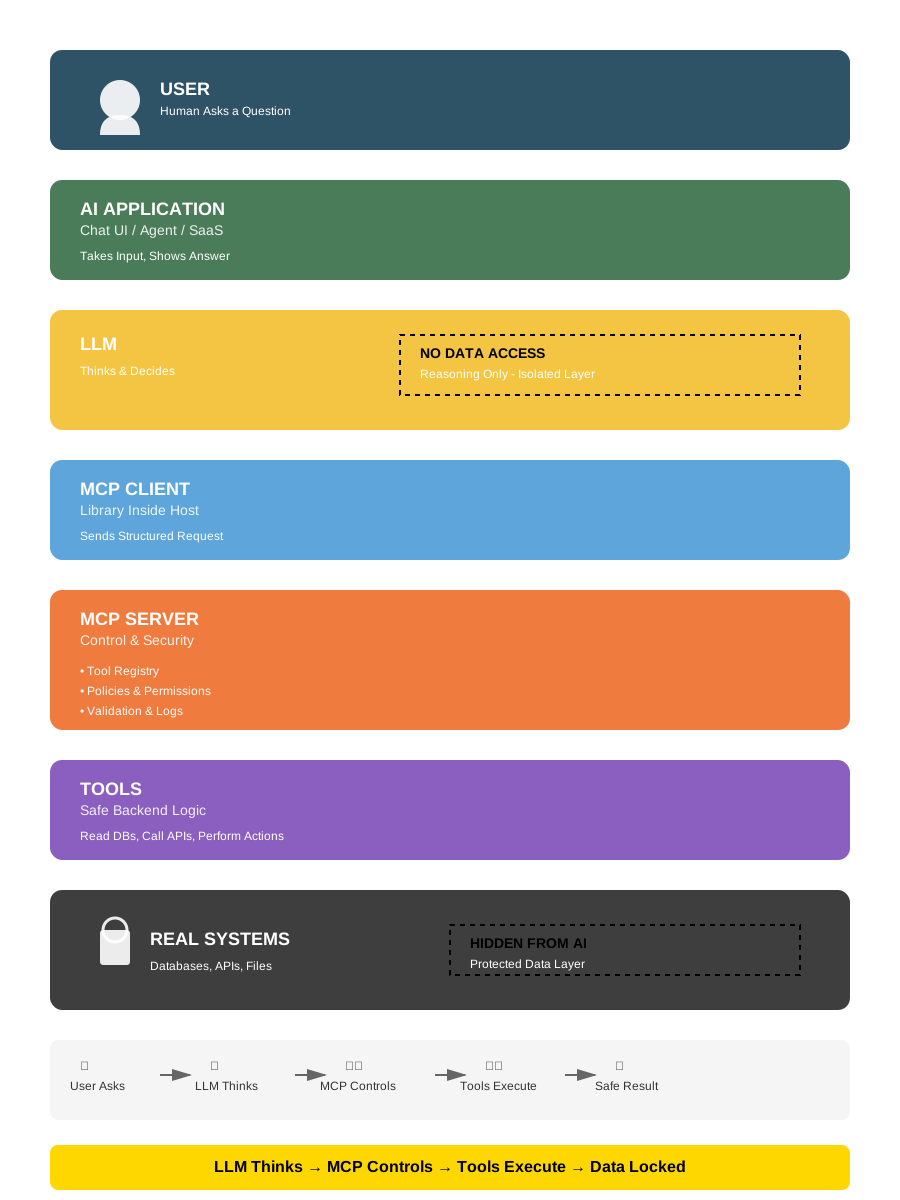
Figure 1: MCP Architecture showing separation between thinking (LLM), control (MCP Server), and execution (Tools). Design inspired by Dinesh Kumar’s LinkedIn visualization, recreated under Apache-2.0 license.
Key security boundaries:
- Yellow layer (LLM): Reasoning only - No Data Access
- Orange layer (MCP Server): Security control point (policies, validation, logs)
- Grey layer (Real Systems): Protected data - Hidden From AI
How MCP works (technical details)
Section titled “How MCP works (technical details)”┌─────────────────────────────────────────────────────────────┐│ MCP INTEGRATION │├─────────────────────────────────────────────────────────────┤│ ││ ┌─────────────────────────────────────────────────────┐ ││ │ CLAUDE CODE │ ││ │ │ ││ │ Native Tools MCP Tools │ ││ │ ┌─────────┐ ┌─────────────────────────┐ │ ││ │ │ Bash │ │ mcp__serena__* │ │ ││ │ │ Read │ │ mcp__context7__* │ │ ││ │ │ Edit │ │ mcp__playwright__* │ │ ││ │ │ ... │ │ mcp__custom__* │ │ ││ │ └─────────┘ └───────────┬─────────────┘ │ ││ │ │ │ ││ └──────────────────────────────────┼──────────────────┘ ││ │ ││ JSON-RPC 2.0 ││ │ ││ ▼ ││ ┌─────────────────────────────────────────────────────┐ ││ │ MCP SERVER │ ││ │ │ ││ │ stdio/HTTP transport │ ││ │ Tool definitions (JSON Schema) │ ││ │ Tool implementations │ ││ │ │ ││ └─────────────────────────────────────────────────────┘ ││ │└─────────────────────────────────────────────────────────────┘Key MCP facts
Section titled “Key MCP facts”| Aspect | Behavior |
|---|---|
| Protocol | JSON-RPC 2.0 over stdio or HTTP |
| Tool naming | mcp__<server>__<tool> convention |
| Context sharing | Only via tool parameters and return values |
| Lifecycle | Server starts on first use, stays alive during session |
| Permissions | Same system as native tools |
What MCP cannot do
Section titled “What MCP cannot do”| Limitation | Explanation |
|---|---|
| Access conversation history | Only sees tool params, not full context |
| Maintain state across calls | Each call is independent (unless server implements caching) |
| Modify Claude’s system prompt | Tools only, no prompt injection |
| Bypass permissions | Same security layer as native tools |
→ Cross-reference: See Section 8.6 - MCP Security for security considerations.
MCP extensions: Apps (SEP-1865)
Section titled “MCP extensions: Apps (SEP-1865)”Status: Stable (January 26, 2026) Spec: SEP-1865 on GitHub Co-authored by: OpenAI, Anthropic, MCP-UI creators
What are MCP Apps?
Section titled “What are MCP Apps?”MCP Apps is the first official extension to the Model Context Protocol, enabling MCP servers to deliver interactive user interfaces alongside traditional tool responses.
The problem solved: Traditional text-based responses create friction for workflows requiring exploration. Each interaction (sort, filter, drill-down) demands a new prompt cycle. MCP Apps eliminates this “context gap” by rendering interactive UIs directly in the conversation.
Technical architecture
Section titled “Technical architecture”Two core primitives:
-
Tools with UI metadata:
{"name": "query_database","description": "Query customer database","_meta": {"ui": {"resourceUri": "ui://dashboard/customers"}}} -
UI Resources (
ui://scheme):- Server-side HTML/JavaScript bundles
- Rendered in sandboxed iframes by host
- Bidirectional JSON-RPC communication via
postMessage
Communication flow:
┌─────────────────────────────────────────────────────────┐│ MCP APPS ARCHITECTURE │├─────────────────────────────────────────────────────────┤│ ││ ┌──────────────┐ ┌──────────────┐ ││ │ MCP Client │◄───────►│ MCP Server │ ││ │ (Claude/IDE) │ JSON-RPC│ (Your App) │ ││ └──────┬───────┘ └──────────────┘ ││ │ ││ │ Fetches ui:// resource ││ ▼ ││ ┌─────────────────────────────────────────┐ ││ │ Sandboxed Iframe (UI Render) │ ││ │ ┌───────────────────────────────────┐ │ ││ │ │ HTML/JS Bundle from Server │ │ ││ │ │ - Interactive dashboard │ │ ││ │ │ - Forms with validation │ │ ││ │ │ - Real-time data visualization │ │ ││ │ └───────────────────────────────────┘ │ ││ │ │ ││ │ postMessage ◄─────► JSON-RPC │ ││ └─────────────────────────────────────────┘ ││ │└─────────────────────────────────────────────────────────┘Security model
Section titled “Security model”Multi-layered protection:
| Layer | Protection |
|---|---|
| Iframe sandbox | Restricted permissions (no direct system access) |
| Pre-declared templates | Hosts review HTML/JS before rendering |
| Auditable messaging | All UI-to-host communication via JSON-RPC logs |
| User consent | Optional requirement for UI-initiated tool calls |
| Content blocking | Hosts can reject suspicious resources pre-render |
→ Cross-reference: See Section 8.6 - MCP Security for broader MCP security considerations.
SDK: @modelcontextprotocol/ext-apps
Section titled “SDK: @modelcontextprotocol/ext-apps”Installation:
npm install @modelcontextprotocol/ext-appsCore API (framework-agnostic):
import { App } from '@modelcontextprotocol/ext-apps';
const app = new App();
// 1. Establish communication with hostawait app.connect();
// 2. Receive tool results from hostapp.ontoolresult = (result) => {  // Update UI with tool execution results  updateDashboard(result.data);};
// 3. Call server tools from UIawait app.callServerTool('fetch_analytics', {  timeRange: '7d',  metrics: ['users', 'revenue']});
// 4. Update model context asynchronouslyawait app.updateModelContext({  selectedFilters: ['region:EU', 'status:active']});
// Additional capabilities:app.logDebug('User action', { filter: 'applied' });app.openBrowserLink('https://docs.example.com');app.sendFollowUpMessage('Applied filters: EU, Active');
Standard communication: All features operate over postMessage (no framework lock-in).
Platform support
Section titled “Platform support”| Platform | MCP Apps Support | Notes |
|---|---|---|
| Claude Desktop | ✅ Available now | claude.ai/directory (Pro/Max/Team/Enterprise) |
| Claude Cowork | 🔄 Coming soon | Agentic workflow integration planned |
| VS Code | ✅ Insiders build | Official blog post |
| ChatGPT | 🔄 Rolling out | Week of Jan 26, 2026 |
| Goose | ✅ Available now | Open-source CLI with UI support |
| Claude Code CLI | ❌ N/A | Terminal text-only (no iframe rendering) |
Relevance for Claude Code users
Section titled “Relevance for Claude Code users”Direct usage: None (CLI is text-only, cannot render iframes)
Indirect benefits:
- Ecosystem understanding: MCP Apps represents the future of agentic workflows
- MCP server development: If building custom MCP servers, Apps is now a design option
- Hybrid workflows:
- Use Claude Desktop to explore data with Apps (dashboards, visualizations)
- Switch to Claude Code CLI for implementation (scripting, automation)
- Context for configuration: MCP servers may advertise UI capabilities in metadata
Example implementations
Section titled “Example implementations”Official example servers (in ext-apps repository):
- threejs-server: 3D visualization and manipulation
- map-server: Interactive geographic data exploration
- pdf-server: Document viewing with inline highlights
- system-monitor-server: Real-time metrics dashboards
- sheet-music-server: Music notation rendering
Production adoption (January 2026):
| Tool | Provider | Capabilities |
|---|---|---|
| Asana | Asana | Project timelines, task boards |
| Slack | Salesforce | Message drafting with formatting preview |
| Figma | Figma | Flowcharts, Gantt charts in FigJam |
| Amplitude | Amplitude | Analytics charts with interactive filtering |
| Box | Box | File search, document previews |
| Canva | Canva | Presentation design with real-time customization |
| Clay | Clay | Company research, contact discovery |
| Hex | Hex | Data analysis with interactive queries |
| monday.com | monday.com | Work management boards |
Coming soon: Salesforce (Agentforce 360)
Relationship to prior work
Section titled “Relationship to prior work”MCP Apps standardizes patterns pioneered by:
- MCP-UI: Early UI extension for MCP (community project)
- OpenAI Apps SDK: Parallel effort for interactive tools
Both frameworks continue to be supported. MCP Apps provides a unified specification (SEP-1865) co-authored by maintainers from both ecosystems plus Anthropic and OpenAI.
Migration path: Straightforward for existing MCP-UI and Apps SDK implementations.
When to use MCP Apps
Section titled “When to use MCP Apps”Decision tree for MCP server developers:
Building a custom MCP server?├─ Users need to SELECT from 50+ options? → MCP Apps (dropdown, multi-select UI)├─ Users need to VISUALIZE data patterns? → MCP Apps (charts, maps, graphs)├─ Users need MULTI-STEP workflows with conditional logic? → MCP Apps (wizard forms)├─ Users need REAL-TIME updates? → MCP Apps (live dashboards)└─ Simple data retrieval or actions only? → Traditional MCP tools (sufficient)Trade-off: UI complexity and implementation effort vs. user experience improvement.
Resources
Section titled “Resources”- Specification: SEP-1865 on GitHub
- SDK:
@modelcontextprotocol/ext-apps(npm) - Example servers: modelcontextprotocol/ext-apps repository
- Blog post (MCP): MCP Apps announcement
- Blog post (Claude): Interactive tools in Claude
- VS Code: MCP Apps support announcement
MCP tool search (lazy loading)
Section titled “MCP tool search (lazy loading)”Source category: Tier 1, Official; bounded by the cited version/date and scope. Source: anthropic.com/engineering/advanced-tool-use
Since v2.1.7 (January 2026), Claude Code uses lazy loading for MCP tool definitions instead of preloading all tools into context. This is powered by Anthropic’s Advanced Tool Use API feature.
The problem solved:
- MCP tool definitions consume significant context (e.g., GitHub MCP alone: ~46K tokens for 93 tools)
- Developer Scott Spence documented 66,000+ tokens consumed before typing a single prompt
- This “context pollution” limited practical MCP adoption
How Tool Search works:
┌─────────────────────────────────────────────────────────────┐│ MCP TOOL SEARCH FLOW │├─────────────────────────────────────────────────────────────┤│ ││ WITHOUT Tool Search (eager loading): ││ ┌──────────────────────────────────────────────────────┐ ││ │All 100+ tool definitions loaded upfront (~55K tokens)│ ││ └──────────────────────────────────────────────────────┘ ││ ││ WITH Tool Search (lazy loading): ││ ┌──────────────────────────────────────────────────────┐ ││ │ Step 1: Only search tool loaded (~500 tokens) │ ││ │ Step 2: Claude determines needed capability │ ││ │ Step 3: Tool Search finds matching tools (regex/BM25)│ ││ │ Step 4: Only matched tools loaded (~600 tokens each) │ ││ │ Step 5: Tool invoked normally │ ││ └──────────────────────────────────────────────────────┘ ││ ││ Result: 55K tokens → ~8.7K tokens (85% reduction) ││ │└─────────────────────────────────────────────────────────────┘Measured improvements (Anthropic benchmarks):
| Metric | Before | After | Improvement |
|---|---|---|---|
| Token overhead (5-server setup) | ~55K | ~8.7K | 85% reduction |
| Opus 4 tool selection accuracy | 49% | 74% | +25 points |
| Opus 4.5 tool selection accuracy | 79.5% | 88.1% | +8.6 points |
| Opus 4.6 adaptive thinking | N/A | Auto-calibrated | Dynamic depth |
Configuration (v2.1.9+):
# Environment variableENABLE_TOOL_SEARCH=auto # Default (10% context threshold)ENABLE_TOOL_SEARCH=auto:5 # Aggressive (5% threshold)ENABLE_TOOL_SEARCH=auto:20 # Conservative (20% threshold)ENABLE_TOOL_SEARCH=true # Always enabledENABLE_TOOL_SEARCH=false # Disabled (eager loading)| Threshold | Recommended for |
|---|---|
auto:20 | Lightweight setups (5-10 tools) |
auto:10 | Balanced default (20-50 tools) |
auto:5 | Power users (100+ tools) |
→ As Simon Willison noted: “Context pollution is why I rarely used MCP. Now that it’s solved, there’s no reason not to hook up dozens or even hundreds of MCPs to Claude Code.” (via X/Twitter, January 14, 2026)
7. Advanced tool use patterns (API)
Section titled “7. Advanced tool use patterns (API)”Source category: Tier 1, Official Anthropic Engineering; bounded by the cited version/date and scope. Source: Anthropic Engineering: Advanced Tool Use | Programmatic Tool Calling Docs
Four API-level features released as generally available on February 18, 2026 (with Opus/Sonnet 4.6). These are relevant to developers building agents on the Anthropic API or Agent SDK. They are not available directly in the Claude Code CLI.
| Feature | Problem Solved | Availability |
|---|---|---|
| Programmatic Tool Calling (PTC) | Agent loops burn tokens on round trips | API + Foundry |
| Dynamic Filtering | Web search bloats context with noise | API + Foundry |
| Tool Search Tool | Too many tool definitions bloat context | API + Foundry |
| Tool Use Examples | Schema alone can’t express usage patterns | API + Foundry |
Strategic layering: address your biggest bottleneck first:
- Context bloated by tool definitions → Tool Search Tool
- Large intermediate results → Programmatic Tool Calling
- Web research returning noise → Dynamic Filtering
- Parameter errors despite correct schema → Tool Use Examples
Programmatic tool calling (PTC)
Section titled “Programmatic tool calling (PTC)”The paradigm shift: instead of calling tools one at a time with a full model round trip each, Claude writes Python code that orchestrates all tool calls internally. Only the final stdout enters the context window.
Traditional: prompt → Claude → tool 1 → response 1 → Claude → tool 2 → response 2 → Claude → answer             (3 tools = 3 inference passes, 3× intermediate results in context)
PTC: prompt → Claude → writes Python → code calls tool 1, 2, 3 → stdout → Claude → answer (3 tools = 1 inference pass, only final output in context)Configuration: mark tools callable from the code execution sandbox with allowed_callers:
{ "tools": [ { "type": "code_execution_20250825", "name": "code_execution" }, { "name": "query_database", "description": "Execute SQL. Returns rows as JSON: id (str), name (str), revenue (float).", "input_schema": { "type": "object", "properties": { "sql": { "type": "string" } }, "required": ["sql"] }, "allowed_callers": ["code_execution_20250825"] } ]}allowed_callers value | Behavior |
|---|---|
omitted / ["direct"] | Traditional calling only |
["code_execution_20250825"] | Callable from Python sandbox only |
["direct", "code_execution_20250825"] | Both modes, not recommended (confuses Claude) |
Patterns (all run in 1 inference pass):
- Batch processing: loop over N items, aggregate, print summary
- Early termination: break as soon as success criteria are met
- Conditional tool selection: pick lightweight vs heavy tool based on intermediate result
- Data filtering: reduce what Claude sees (
errors = [l for l in logs if "ERROR" in l])
Token efficiency: tool results from programmatic calls never enter Claude’s context; only final stdout does. 10 programmatic tool calls ≈ 1/10th the context tokens of 10 direct calls. The ~37% overall token reduction claim is community-reported (Shayan Tabe’s analysis) and not officially confirmed by Anthropic.
Constraints: API and Foundry only (not Bedrock/Vertex). No MCP tools, no web search/fetch, no strict: true tools. Container lifetime ~4.5 minutes. Not covered by Zero Data Retention.
Dynamic filtering for web search/fetch
Section titled “Dynamic filtering for web search/fetch”Web search and fetch tools dump full HTML into context: navigation, ads, boilerplate included. Dynamic Filtering lets Claude write Python to pre-process and filter results before they enter its context window.
Configuration: use updated tool type versions with a beta header:
{ "tools": [ { "type": "web_search_20260209", "name": "web_search" }, { "type": "web_fetch_20260209", "name": "web_fetch" } ]}Header required: anthropic-beta: code-execution-web-tools-2026-02-09. Filtering is enabled by default when using these tool type versions with Sonnet 4.6 or Opus 4.6.
Official benchmark results (Anthropic, BrowseComp dataset):
| Model | Without Filtering | With Filtering | Improvement |
|---|---|---|---|
| Sonnet 4.6 | 33.3% | 46.6% | +13.3 pp |
| Opus 4.6 | 45.3% | 61.6% | +16.3 pp |
Average input token reduction: ~24%. Best suited for multi-step research, citation verification, and extracting specific data points from large pages.
Tool use examples
Section titled “Tool use examples”JSON schemas define structure but can’t express when to include optional parameters, which combinations make sense, or format conventions. Add input_examples to tool definitions to show concrete usage patterns:
{ "name": "create_ticket", "input_schema": { ... }, "input_examples": [ { "title": "Login page 500 error", "priority": "critical", "assignee": "oncall-team", "labels": ["bug", "auth"] }, { "title": "Add dark mode", "priority": "low", "labels": ["feature-request"] }, { "title": "Update API docs for v2" } ]}Accuracy on complex parameter handling: 72% → 90% in Anthropic’s benchmarks. Use 1-5 realistic examples per tool, covering minimal, partial, and full specifications.
Claude Code relevance
Section titled “Claude Code relevance”| Feature | Claude Code CLI | Action for CLI users |
|---|---|---|
| Tool Search (MCP lazy loading) | Built-in since v2.1.7 as MCPSearch auto mode | Tune ENABLE_TOOL_SEARCH=auto:N (documented in §6 above) |
| Tool Use Examples | Not configurable from CLI | Relevant for custom MCP server authors; add input_examples to tool schemas |
| Programmatic Tool Calling | Not available in CLI | Relevant for Agent SDK developers building custom agents |
| Dynamic Filtering | Not available in CLI | Relevant for Agent SDK users doing web research pipelines |
8. The edit tool: How it actually works
Section titled “8. The edit tool: How it actually works”Source category: Tier 2, Verified through behavior; limited to the cited observation and method. Sources:
- Observed behavior
- github.com/cline/cline/issues/2909 (similar implementation)
The Edit tool is more sophisticated than it appears.
Edit algorithm
Section titled “Edit algorithm”┌─────────────────────────────────────────────────────────────┐│ EDIT TOOL FLOW │├─────────────────────────────────────────────────────────────┤│ ││ Input: old_string, new_string, file_path ││ ││ ┌──────────────────────────────────────┐ ││ │ Step 1: EXACT MATCH │ ││ │ Search for literal old_string │ ││ └────────────────┬─────────────────────┘ ││ │ ││ Found? ────┴──── Not found? ││ │ │ ││ ▼ ▼ ││ ┌──────────┐ ┌──────────────────┐ ││ │ REPLACE │ │ Step 2: FUZZY │ ││ │ (done) │ │ MATCH │ ││ └──────────┘ └────────┬─────────┘ ││ │ ││ Found? ────┴──── Not found? ││ │ │ ││ ▼ ▼ ││ ┌──────────┐ ┌──────────────┐ ││ │ REPLACE │ │ ERROR │ ││ │ + WARN │ │ (mismatch) │ ││ └──────────┘ └──────────────┘ ││ │└─────────────────────────────────────────────────────────────┘Fuzzy matching details
Section titled “Fuzzy matching details”When exact match fails, the Edit tool attempts:
- Whitespace normalization: Ignore trailing spaces, normalize indentation
- Line ending normalization: Handle CRLF vs LF differences
- Context expansion: Use surrounding lines to locate the right spot
If fuzzy matching also fails, the tool returns an error asking Claude to verify the old_string.
Edit validation
Section titled “Edit validation”Before applying changes, the Edit tool:
| Check | Purpose |
|---|---|
| File exists | Prevent creating files via Edit |
| old_string found | Ensure we’re editing the right place |
| Single match | old_string must be unique (or use replace_all) |
| New content differs | Prevent no-op edits |
When edit fails
Section titled “When edit fails”| Error | Cause | Claude’s Response |
|---|---|---|
| ”old_string not found” | Content changed since last read | Re-reads file, tries again |
| ”Multiple matches” | old_string isn’t unique | Uses more context lines |
| ”File not found” | Wrong path | Searches for correct path |
9. Session persistence
Section titled “9. Session persistence”Source category: Tier 1, Official; bounded by the cited version/date and scope. Source: code.claude.com/docs
Sessions can be resumed across terminal sessions.
Resume mechanisms
Section titled “Resume mechanisms”| Command | Behavior |
|---|---|
claude --continue / claude -c | Resume most recent session |
claude --resume <id> / claude -r <id> | Resume specific session by ID |
What gets persisted
Section titled “What gets persisted”| Persisted | Not Persisted |
|---|---|
| Conversation history | Live tool state |
| Tool call results | Pending operations |
| Session ID | File locks |
| Working directory context | Environment variables |
Storage format
Section titled “Storage format”Source category: Tier 3, Inferred; unverified explanation.
Sessions appear to be stored as JSON/JSONL files in ~/.claude/ but:
- Format is not publicly documented
- Not intended as a stable API
- May change between versions
Do not rely on session file format for external tooling.
10. Philosophy: Less scaffolding, more model
Section titled “10. Philosophy: Less scaffolding, more model”Source category: Tier 1, Official; bounded by the cited version/date and scope. Source: Daniela Amodei (Anthropic Co-founder & President) - Public statements
The core philosophy behind Claude Code:
“Do more with less. Smart architecture choices, better training efficiency, and focused problem-solving can compete with raw scale.”
What this means in practice
Section titled “What this means in practice”| Traditional Approach | Claude Code Approach |
|---|---|
| Intent classifier → Router → Specialist | Model-driven actions subject to permission controls |
| RAG with embeddings | Grep + Glob (regex search) |
| DAG task orchestration | Central agentic loop; optional workflows and delegation |
| Tool-specific planners | Model-driven tool selection |
| Complex state machines | Conversation as state |
| Prompt engineering frameworks | Trust the model |
Why it works
Section titled “Why it works”- Model capability: Claude 4+ is capable enough to handle routing decisions
- Reduced latency: Fewer components = faster response
- Simpler debugging: When something fails, there’s one place to look
- Better generalization: No hand-coded rules to break on edge cases
The Trade-offs
Section titled “The Trade-offs”| Advantage | Disadvantage |
|---|---|
| Simplicity | Less fine-grained control |
| Flexibility | Harder to enforce strict behaviors |
| Fewer bugs | Model errors affect everything |
| Fast iteration | Requires good model quality |
Community validation
Section titled “Community validation”The “native capabilities first” approach is increasingly validated by external practitioners. Embedded engineering teams (including former Cursor power users) converge on Agent Skills standard over external orchestration frameworks, demonstrating the viability of trusting Claude’s native reasoning over adding scaffolding layers.
Example: Gur Sannikov (embedded engineering) adopted ADR-driven workflows using only native Claude Code capabilities (hooks, skills, Task Tool) without external frameworks, validating the architectural philosophy documented in this guide.
This convergence suggests that the “less scaffolding, more model” approach scales beyond initial expectations, even for complex engineering domains like embedded systems development.
11. Claude Code vs alternatives
Section titled “11. Claude Code vs alternatives”Source category: Tier 2, Based on March 2026 fact-checked data; limited to the cited observation and method. Sources: Official documentation, Perplexity research March 2026, vendor changelogs
| Dimension | Claude Code | GitHub Copilot | Cursor | Amazon Q Developer |
|---|---|---|---|---|
| Architecture | while(tool) loop | IDE agent + cloud coding agent | Event-driven + cloud | AWS-integrated agents |
| Execution | Local terminal | Local (agent mode) + cloud VMs | Local + cloud | Cloud/local hybrid |
| Model | Claude (single provider) | GPT, Claude, Codex (selectable) | Multiple (adaptive) | Amazon Titan + others |
| Context | Model and configuration dependent (200K or 1M tokens) | Full codebase (agent mode) | Codebase-aware (Composer) | Varies (AWS-scoped) |
| Transparency | High (visible reasoning) | Medium | Medium | Low |
| Customization | CLAUDE.md + hooks + MCP | AGENTS.md, MCP (GA), custom agents | MCP Apps, .cursorrules | MCP (native), AWS integration |
| MCP Support | Native | Yes (GA, auto-approve) | Yes (MCP Apps v2.6) | Yes (native) |
| Pricing | Pro $20 / Max $100-200 | Free / Pro $10 / Pro+ $39 / Biz $19/seat | Free / Pro $20 / Biz $40/seat | Free / Pro $19/seat / Enterprise |
When to choose Claude Code
Section titled “When to choose Claude Code”| Scenario | Claude Code | Alternative |
|---|---|---|
| Deep codebase exploration | Excellent | Good |
| Terminal-native workflow | Excellent | Limited |
| Custom automation (hooks) | Excellent | Limited |
| Team standardization | Good (CLAUDE.md) | Varies |
| IDE integration | Limited (VS Code ext) | Cursor/Copilot better |
| Enterprise compliance | Via Anthropic enterprise | Varies |
12. Sources & references
Section titled “12. Sources & references”Tier 1 - official Anthropic
Section titled “Tier 1 - official Anthropic”| Source | URL | Topics |
|---|---|---|
| Engineering Blog | anthropic.com/engineering/claude-code-best-practices | Master loop, philosophy |
| Setup Docs | code.claude.com/docs/en/setup | Install, auth, release channels |
| Commands Reference | code.claude.com/docs/en/commands | Source of truth for every built-in slash command, aliases, bundled skills and workflows |
| CLI Reference | code.claude.com/docs/en/cli-reference | Launch-time flags and subcommands |
| Context Windows | platform.claude.com/docs/en/build-with-claude/context-windows | Token limits |
| Hooks Reference | code.claude.com/docs/en/hooks | Hook system |
| Hooks Guide | code.claude.com/docs/en/hooks-guide | Hook examples |
| MCP Docs | code.claude.com/docs/en/mcp | MCP integration |
| Sandboxing | code.claude.com/docs/en/sandboxing | Security model |
| llms.txt (index) | code.claude.com/docs/llms.txt | LLM-optimized doc index, ~65 pages |
| llms-full.txt | code.claude.com/docs/llms-full.txt | Full documentation (~98 KB text) |
Tier 2 - verified analysis
Section titled “Tier 2 - verified analysis”| Source | URL | Topics |
|---|---|---|
| PromptLayer Analysis | blog.promptlayer.com/claude-code-behind-the-scenes-of-the-master-agent-loop/ | Internal architecture |
| Steve Kinney Course | stevekinney.com/courses/ai-development/claude-code-* | Permissions, sessions |
Tier 3 - community resources
Section titled “Tier 3 - community resources”| Source | Topics |
|---|---|
| GitHub Issues (anthropics/claude-code) | Edge cases, bugs, feature discussions |
| Reddit r/ClaudeAI | User experiences, workarounds |
| YouTube tutorials | Visual walkthroughs |
13. Appendix: What we don’t know
Section titled “13. Appendix: What we don’t know”Transparency about gaps in our understanding:
Unknown or unconfirmed
Section titled “Unknown or unconfirmed”| Topic | What We Don’t Know | Confidence in Current Understanding |
|---|---|---|
| Exact compaction threshold | Is it 75%? 85%? 92%? Varies by model? | 40% |
| System prompt contents | Full text not public, varies by model version | 30% |
| Token counting method | Exact tokenizer, overhead for tool schemas | 50% |
| Model fallback | Does Claude Code fallback if a model fails? | 20% |
| Internal caching | Is there result caching between sessions? | 20% |
| Rate limiting logic | How rate limits are applied per-tool | 40% |
Explicitly undocumented
Section titled “Explicitly undocumented”These are intentionally not documented by Anthropic:
- Session file format (internal implementation detail)
- System prompt variations between models
- Internal component names/architecture
- Token usage breakdown per component
- Exact permission evaluation order
How to stay updated
Section titled “How to stay updated”- Official changelog: Watch anthropic.com/changelog
- GitHub releases: github.com/anthropics/claude-code/releases
- Community Discord: Various Claude-focused servers
- This guide: Updated periodically based on verified information
Contributing
Section titled “Contributing”Found an error? Have verified new information? Contributions welcome:
- For official facts: Cite the Anthropic source
- For observations: Describe how you verified the behavior
- For corrections: Explain what’s wrong and why
Last updated: February 2026 Claude Code version: v2.1.34 Document version: 1.1.0
Anthropic API patterns for architects
Section titled “Anthropic API patterns for architects”Three API-level features that architects must understand for production systems: the Message Batches API for cost-optimized bulk processing, tool_choice for guaranteed structured output, and strict-mode JSON schema enforcement.
Message Batches API
Section titled “Message Batches API”The Batches API submits up to 100 messages in a single HTTP request and processes them asynchronously within a 24-hour window. The cost is 50% of the synchronous rate: same quality, half the price, at the cost of latency.
When to use it:
| Use case | Sync API | Streaming | Batch API |
|---|---|---|---|
| Interactive chat | yes | yes | no |
| Real-time analysis | yes | yes | no |
| Bulk document processing | no | no | yes (50% cheaper) |
| Multi-turn tool loops | yes | yes | no (not supported) |
| Nightly classification pipeline | no | no | yes |
| Large-scale data extraction | no | no | yes |
The Batches API does not support multi-turn conversations or tool_use continuation across turns. Each request in a batch is a single stateless call.
Submit, poll, retrieve:
import anthropicimport time
client = anthropic.Anthropic()
batch = client.messages.batches.create(    requests=[        {            "custom_id": f"doc-{i}",            "params": {                "model": "claude-opus-5-5",                "max_tokens": 1024,                "messages": [                    {"role": "user", "content": f"Classify this document: {doc}"}                ]            }        }        for i, doc in enumerate(documents)    ])
# Poll until done (processing_status: "in_progress" | "ended")while batch.processing_status == "in_progress":    time.sleep(60)    batch = client.messages.batches.retrieve(batch.id)
# Stream results — each entry has a custom_id and a resultfor result in client.messages.batches.results(batch.id):    match result.type:        case "succeeded":            output = result.message.content[0].text            process(result.custom_id, output)        case "errored":            log_error(result.custom_id, result.error.error.message)        case "expired":            requeue(result.custom_id)
Results stay available for 29 days after the batch ends, then are deleted automatically.
Error handling at scale:
Per-request errors do not fail the entire batch. A batch with 100 requests where 3 fail still returns 97 successful results. The pattern for resilient pipelines:
- Process all
succeededresults immediately. - Collect
erroredcustom_ids for retry with exponential backoff. - Treat
expiredas a soft failure: the request never ran, so requeue it.
Retry economics:
Retrying individual failed items synchronously costs 2x the batch rate. If your error rate is below 5%, retrying synchronously is still net-cheaper than splitting batches further. Above 10% error rate, investigate the prompt before retrying at all.
tool_choice: Controlling when tools fire
Section titled “tool_choice: Controlling when tools fire”tool_choice governs whether and which tools the model can call. Four modes:
| Value | Behavior |
|---|---|
{"type": "auto"} | Model decides; may or may not call tools (default) |
{"type": "any"} | Model must call at least one tool from the provided list |
{"type": "tool", "name": "X"} | Model must call tool X specifically |
{"type": "none"} | No tool calls allowed; model responds in prose |
The any and specific-tool modes request a tool call where supported. Inspect stop_reason and the returned blocks; a refusal or output limit is not proof that the model ignored an instruction.
Forcing a tool is model-dependent. Check thinking compatibility before using any or a named tool. Do not infer success from the requested choice alone: handle refusals, output limits, and the actual response blocks. For schema-constrained JSON, use the dedicated format below.
Structured Outputs: strict Mode
Section titled “Structured Outputs: strict Mode”Structured outputs are generally available. Use output_config.format for JSON responses, or strict: true at the tool-definition level for validated tool arguments. The old beta header and output_format examples are obsolete. Official structured outputs documentation.
import json
response = client.messages.create(    model="claude-opus-5-5",    max_tokens=4096,    output_config={"format": {        "type": "json_schema",        "schema": {            "type": "object",            "properties": {                "vendor_name": {"type": ["string", "null"]},                "total_amount": {"type": ["number", "null"]},            },            "required": ["vendor_name", "total_amount"],            "additionalProperties": False,        },    }},    messages=[{"role": "user", "content": invoice_text}],)if response.stop_reason != "end_turn":    raise RuntimeError(f"Incomplete or refused extraction: {response.stop_reason}")text = next(block.text for block in response.content if block.type == "text")fields = json.loads(text)
For tools, strict sits alongside name, description, and input_schema, not inside the schema. Schema conformance does not establish semantic accuracy. Validate extracted values against the document and handle refusals or truncated output before consuming the result.
Nullable fields prevent hallucination of defaults:
Without nullable, the model must fill every required field and will invent a value rather than leave it empty. Nullable fields give the model an explicit out:
"vendor_name": {"type": ["string", "null"]}The model returns null when the field cannot be found, rather than guessing.
Extensible enums with companion fields:
Closed enums break when inputs don’t fit any category. The solution: add "other" as the last enum value and a companion detail field:
{ "document_type": { "type": "string", "enum": ["invoice", "purchase_order", "receipt", "credit_note", "other"] }, "document_type_detail": { "type": ["string", "null"], "description": "Populate when document_type is 'other'; describe the actual document type" }}This preserves the type-safety of the enum for the 95% case while capturing the 5% gracefully.
detected_pattern for false-positive analysis:
In classification pipelines, a detected_pattern field surfaces the evidence the model used. This turns opaque classifications into debuggable decisions:
{ "is_complaint": {"type": "boolean"}, "detected_pattern": { "type": ["string", "null"], "description": "Quote the specific phrase or pattern that triggered the classification" }, "confidence": {"type": "number"}}When is_complaint: true with detected_pattern: "your service is terrible", a human reviewer can validate the classification in seconds. When detected_pattern: null and confidence: 0.6, that is a signal to escalate for manual review rather than auto-process.