
Navigation Explore Code Guide
Learning to Code with AI: The Conscious Developer's Guide
Last updated:
Confidence: Tier 2, based on academic research (2023-2025) and educator feedback
Audience: Junior developers, CS students, bootcamp graduates, career changers
Reading time: ~15 minutes
Last updated: August 2026
Table of contents
Section titled “Table of contents”- Quick Self-Check (Start Here)
- The Problem in 60 Seconds
- The Reality of AI Productivity
- The Three Patterns
- The UVAL Protocol
- Claude Code for Learning
- Breaking Dependency (Pattern: Dependent)
- Embracing AI Tools (Pattern: Avoidant)
- Optimizing Your Flow (Pattern: Augmented)
- Case Study: Hybrid Learning Principles
- Where Are You on the Agent Adoption Curve?
- 30-Day Progression Plan
- For Tech Leads & Engineering Managers
- The Attention Cost of the Review Shift
- Red Flags Checklist
- Sources & Research
- See Also
Quick self-check (start here)
Section titled “Quick self-check (start here)”Before diving in, answer honestly:
| # | Question | Yes | No |
|---|---|---|---|
| 1 | Can you explain the last code that AI generated for you? | ☐ | ☐ |
| 2 | Have you debugged code without AI this week? | ☐ | ☐ |
| 3 | Do you know WHY the solution works (not just THAT it works)? | ☐ | ☐ |
| 4 | Could you write the same function without assistance? | ☐ | ☐ |
| 5 | Do you know the AI’s limitations on this type of problem? | ☐ | ☐ |
Your score
Section titled “Your score”| Score | Where You Are | Jump To |
|---|---|---|
| 0-2 yes | Dependency risk: you’re outsourcing thinking | §6 Breaking Dependency |
| 3-4 yes | On track, room for optimization | §8 Optimizing Your Flow |
| 5 yes | Augmented: you’re using AI correctly | §9 Case Study |
Be honest. This guide only helps if you acknowledge where you actually are.
The problem in 60 seconds
Section titled “The problem in 60 seconds”AI can make you 3x more productive OR unemployable in 3 years. The difference? How you use it.
Forget the statistics for now. Here’s a simple metaphor:
AI is your GPS.
- Great for getting somewhere fast
- Dangerous if you lose the ability to navigate without it
- Truly useful when you understand the map AND use the GPS
A developer who only copy-pastes AI output is like a driver who can’t read a map. Fine until the GPS fails, or until someone asks them to explain the route.
The skills gap
Section titled “The skills gap”Traditional learning: Problem → Struggle → Understanding → SolutionAI-assisted (wrong): Problem → AI → Solution → ??? (no understanding)AI-assisted (right): Problem → Attempt → AI guidance → Understanding → SolutionThe struggle isn’t optional. It’s where learning happens.
The “Vibe Coding” trap
Section titled “The “Vibe Coding” trap”Term coined by Andrej Karpathy (Feb 2025, Collins Word of the Year 2025): coding by “fully giving in to the vibes” without understanding the generated code.
Related: For team and OSS contexts, see AI Traceability for disclosure policies (LLVM, Ghostty, Fedora) and attribution tools.
Symptoms:
- Accept All without reading diffs
- Copy-paste errors without understanding root cause
- Debug by asking AI for random changes until it works
Karpathy’s caveat: “Not too bad for throwaway weekend projects”, but dangerous for production code you’ll need to maintain.
Proposed practice: UVAL (§5) provides checkpoints for examining understanding before acceptance; its effect on retention and transfer needs assessment.
Related: For context management strategies that prevent vibe coding chaos, see Anti-Pattern: Context Overload in the main guide (§9.8).
At team scale, vibe coding accumulates into what some practitioners call comprehension debt (an emerging term, 2025-2026): the growing gap between how much code exists in a system and how much any human genuinely understands. Unlike technical debt, which surfaces through slow builds and tangled dependencies, comprehension debt breeds false confidence: velocity looks fine, tests are green, and the reckoning arrives at the worst possible moment, usually during an incident or an audit.
The reality of AI productivity
Section titled “The reality of AI productivity”Before optimizing your learning approach, understand what productivity research actually shows. It’s more nuanced than the marketing suggests.
The productivity curve (not a straight line)
Section titled “The productivity curve (not a straight line)”Most developers experience three distinct phases:
| Phase | Timeline | Productivity | What’s Happening |
|---|---|---|---|
| Wow Effect | 0-2 weeks | ~0% gain | Excitement masks learning curve; time spent prompting offsets time saved |
| Targeted Gains | 2-8 weeks | +20-50% | AI accelerates specific tasks you’ve learned to delegate effectively |
| Sustainable Plateau | 3-6 months | +20-30% | Stable gains, but only for developers who already have strong fundamentals |
Critical nuance: These gains are conditional. Studies show experienced developers (5+ years) see larger, sustained gains. Junior developers often see initial spikes followed by regression, because speed without understanding creates technical debt. A 2026 RCT (Shen & Tamkin, Anthropic Fellows) measured a 17% reduction in skills acquisition when developers learned a new library with AI assistance (n=52, p=0.01), with no significant time savings. Only ~20% of AI users (pure delegation pattern) finished faster, at the cost of learning almost nothing.
Check whether to continue: Repeated failures, reported fatigue or difficulty explaining the next action can justify a pause, a smaller task or additional help. Agree and assess a cadence locally; these observations do not establish a medical condition or its cause. See Check whether to continue.
Where AI helps (and where it hurts)
Section titled “Where AI helps (and where it hurts)”| High-Gain Tasks | Low/Negative-Gain Tasks |
|---|---|
| Boilerplate generation | Architecture decisions |
| Test scaffolding | Domain-specific logic |
| Refactoring known patterns | Deep debugging |
| Documentation drafts | Fine-grained optimization |
| Codebase onboarding | Security-critical code |
| CRUD operations | Novel algorithm design |
The pattern: AI excels at well-defined, repeatable tasks. It struggles with ambiguous problems requiring deep context or creative judgment.
Why some teams get results (and others don’t)
Section titled “Why some teams get results (and others don’t)”Teams that succeed:
- Establish clear AI usage guidelines (when to use, when not to)
- Maintain code review standards (AI-generated code reviewed same as human code)
- Build shared prompt libraries for common tasks
- Pair junior developers with seniors when using AI
Teams that stagnate:
- No standards for AI-generated code quality
- Juniors using AI without oversight
- Measuring velocity without measuring understanding
- Skipping code review because “AI wrote it”
The tool matters less than the organizational discipline around it.
The review bottleneck has inverted. When code was expensive to produce, senior engineers could review it faster than juniors could write it. Review was a quality gate. AI flips this: a junior can now generate code faster than a senior can critically audit it. The rate-limiting factor that historically kept review meaningful has been removed. What used to be a quality gate is now a throughput problem. Teams that don’t account for this end up rubber-stamping AI-generated code at scale.
Verifying AI-produced code is becoming the higher-value skill, ahead of writing it from scratch. This reframes systematic, rigorous review of an agent’s output as the central competency worth developing, rather than raw typing speed.
Mehran Sahami, Stanford, “It’s Never Too Late”, 2025
For team leads: If you’re responsible for structuring this (onboarding, policies, growth measurement), jump to §12 For Tech Leads & Engineering Managers.
On maintainability fear: The concern that AI-generated code creates unmaintainable codebases is not empirically supported: downstream developers show no significant difference in evolution time or code quality (Borg et al., 2025, n=151). The real risks are skill atrophy and over-delegation, not inherent quality degradation for the next developer. (arXiv:2507.00788)
Implications for learning
Section titled “Implications for learning”This research shapes the rest of this guide:
- The 70/30 rule (§5) is calibrated to where AI helps vs. hurts learning, not arbitrary
- The Three Patterns below map to these productivity outcomes
- Breaking Dependency (§6) addresses the junior developer trap specifically
The three patterns
Section titled “The three patterns”Every developer using AI falls into one of three patterns:
| Pattern | Signs | Risk | This Guide |
|---|---|---|---|
| Dependent | Copy-paste without understanding, can’t debug AI code, anxiety without AI | Unemployable | §7 |
| Avoidant | Refuses AI “on principle”, slower than peers, dismissive of tools | Left behind | §8 |
| Augmented | Uses AI critically, understands everything, knows AI limits | Thriving | §9 |
Productivity trajectory by pattern (based on §3 research):
| Pattern | 0-2 weeks | 2-8 weeks | 6+ months |
|---|---|---|---|
| Dependent | +50% (illusory) | +20% | -10% (debt accumulates) |
| Avoidant | -30% | -20% | 0% (no AI leverage) |
| Augmented | +10% | +30-50% | +20-30% (sustainable) |
Pattern 1: Dependent
Section titled “Pattern 1: Dependent”How you got here: Started with AI from day one, never built foundational skills, deadline pressure made shortcuts appealing.
The trap: You ship code you can’t explain. When it breaks, you’re stuck. In interviews, you freeze.
What interviewers see:
- Can’t whiteboard basic algorithms
- Struggles with “why did you choose this approach?”
- Asks to “look something up” for fundamental concepts
Pattern 2: Avoidant
Section titled “Pattern 2: Avoidant”How you got here: Purist mindset, fear of “cheating”, learned before AI tools existed, distrust of new technology.
The trap: You’re slower than peers. You spend hours on problems AI solves instantly. Struggling more doesn’t make you learn faster. It just makes you slower.
What teams see:
- Reinventing wheels unnecessarily
- Slow on routine tasks
- Resistance to modern tooling
Pattern 3: Augmented
Section titled “Pattern 3: Augmented”How you got here: Built foundations first OR consciously fixed Pattern 1/2 habits, treat AI as tool not crutch, verify everything.
The advantage: You move fast AND understand deeply. You use AI for leverage, not replacement.
What hiring managers see:
- Fast delivery with clear explanations
- Can work with OR without AI
- Uses tools appropriately for the task
The UVAL protocol
Section titled “The UVAL protocol”A proposed practice for checking understanding during AI-assisted work. It does not establish a retention benefit or replace the policy for accepting a change.
Overview
Section titled “Overview”| Step | Action | Why It Matters |
|---|---|---|
| U | Understand First | Ask better questions, catch wrong answers |
| V | Verify | Check explanation and prediction against evidence |
| A | Apply | Apply a requirement, predict a result or diagnose a defect |
| L | Learn | Record an insight and assess later recall or transfer |
For the reasoning behind naming this a protocol rather than a habit, see the UVAL protocol and its proposed comprehension checks.
U: Understand first (the 15-minute rule)
Section titled “U: Understand first (the 15-minute rule)”Not just “think for 15 minutes”, a specific protocol:
Step 1: State the Problem (2 min)
Section titled “Step 1: State the Problem (2 min)”Write the problem in ONE sentence. If you can’t, you don’t understand it yet.
❌ "The code doesn't work"✅ "The login form doesn't show validation errors when email is empty"Step 2: Brainstorm Approaches (5 min)
Section titled “Step 2: Brainstorm Approaches (5 min)”List 3 possible approaches, even if you’re not sure they’ll work:
1. Add client-side validation with JavaScript2. Use HTML5 required attribute3. Add server-side validation and return errorsThis forces you to think before asking AI.
Step 2.5: Check whether to continue
Section titled “Step 2.5: Check whether to continue”Note reported fatigue, frustration, repeated failed attempts and difficulty explaining the next action. These observations can justify a pause, a smaller task or help from another person; they do not diagnose a condition or identify its cause. Agree a cadence suited to the task and evaluate it locally. Clearing an agent context and recovering human attention are separate interventions.
Step 3: Identify knowledge gaps (3 min)
Section titled “Step 3: Identify knowledge gaps (3 min)”What specifically do you NOT know?
- I know I need validation, but I don't know how to display inline errors in React- I've never used Zod before but it keeps coming upStep 4: THEN ask AI (5 min)
Section titled “Step 4: THEN ask AI (5 min)”The revised question names the missing knowledge:
❌ "How do I add validation?"✅ "I'm building a React login form. I want to:   1. Validate email format client-side   2. Show inline error messages below the input   3. Use Zod for schema validation
   I've tried using the HTML required attribute but need custom error messages.   What's the idiomatic React approach?"
The revised question makes the missing knowledge and expected behavior explicit.
Claude Code implementation
Section titled “Claude Code implementation”Add to your CLAUDE.md:
## Learning ModeBefore generating code for me, ask:1. What approaches have I already considered?2. What specifically am I stuck on?3. What do I expect the solution to look like?
If I skip these, remind me to think first.
V: Verify (explain it back)
Section titled “V: Verify (explain it back)”The rule: If you can’t explain the code to a colleague, you haven’t learned it.
An explanation also needs a behavioral check. Necessary or Sufficient? found that models’ cited top three did not reliably identify the highest-scoring features under the tested input interventions in two synthetic decision tasks. It does not test human learning or validate UVAL. As a local exercise, predict a boundary case, change the input, and compare the actual result with the explanation.
The rubber duck protocol
Section titled “The rubber duck protocol”After AI generates code:
- Read every line out loud
- Explain what each part does
- Explain WHY it’s done this way (not just what)
- Identify parts you don’t understand
- Ask AI to explain those specific parts
Example
Section titled “Example”AI generates:
const schema = z.object({ email: z.string().email(), password: z.string().min(8)}).refine(data => data.password !== data.email, { message: "Password cannot be email", path: ["password"]});Your explanation:
- Line 1: Creates a Zod schema object
- Lines 2-3: Validates email format and password length
- Lines 4-6: Adds custom validation… wait, what does
refinedo?
→ Now ask AI specifically about refine instead of just copying the whole thing.
Claude Code implementation
Section titled “Claude Code implementation”Create a custom slash command /explain-back:
# Explain Back
After I accept generated code, help me verify understanding.
## Instructions
1. Show the code I just accepted2. Ask me to explain what each major section does3. Correct any misunderstandings4. If I can't explain it, break it down further
## Example Prompt
"You just accepted this code. Can you explain:1. What problem does it solve?2. Why was this approach chosen?3. What would break if we removed line X?"
See /learn:quiz command for a more comprehensive version.
A: Apply (predict, test, adapt)
Section titled “A: Apply (predict, test, adapt)”Keep correct code unchanged when no requirement calls for an edit. Renaming a variable, changing a loop or pasting code does not by itself establish how much someone learned.
Choose a behavior to predict before executing a check. For a cart total, specify whether an invalid price should be rejected, coerced or ignored; those choices are different contracts. A conversion such as Number(value) || 0 silently maps some invalid inputs to zero and is not evidence of correct validation.
| Exercise | Observation to record |
|---|---|
| Predict an empty-input or duplicate-item case | Prediction, actual result and explanation of the difference |
| Apply a changed requirement | The invariant preserved and the test that observes it |
| Diagnose a seeded defect | Reproduction, cause and correction, with help recorded |
| Resume on a new comparable task | What transfers without replaying the same explanation |
These are proposed learning checks, not a ranking of learning by edit type. A later assessment is needed to establish retention. Use the comprehension exercise to record evidence without requiring cosmetic edits.
L: Learn (capture the insight)
Section titled “L: Learn (capture the insight)”Not a daily journal: nobody maintains those. Instead: automated capture.
The one-thing rule
Section titled “The one-thing rule”At the end of each coding session, capture ONE thing you learned. Not ten. One.
## 2026-01-17**Learned**: Zod's `refine()` method for cross-field validation**Context**: Login form needed password ≠ email check**Future me**: Use refine() when validation involves multiple fieldsClaude Code implementation
Section titled “Claude Code implementation”Create a session-end hook:
# Prompts for one learning at session endSee examples/hooks/bash/learning-capture.sh for implementation.
The hook asks: “What’s ONE thing you learned this session?” and logs it automatically.
Claude Code for learning (not just producing)
Section titled “Claude Code for learning (not just producing)”Claude Code has specific features that support learning. Here’s how to configure them.
Start here: /powerup
Section titled “Start here: /powerup”Before configuring anything, run /powerup. It’s a built-in command that walks you through Claude Code’s core features via interactive animated lessons, each one short, hands-on, and designed to show rather than tell. Start here if you’ve never done a structured onboarding of the tool.
CLAUDE.md configuration for learning mode
Section titled “CLAUDE.md configuration for learning mode”Create this in your CLAUDE.md:
# Learning-First Configuration
## My Learning Goals- I'm learning: [React hooks, TypeScript, system design, etc.]- My level: [beginner/intermediate] on these topics- I learn best when: [examples are shown first, concepts are explained, etc.]
## Response Style- Always explain WHY, not just WHAT- After code blocks, ask "What questions do you have about this?"- Highlight concepts I should understand deeper- Point out common mistakes beginners make
## Challenges- Suggest exercises to reinforce concepts after implementing- Point out edge cases I should consider- Ask me to predict output before showing it
## When I Ask for Help1. First ask what I've already tried2. Guide me toward the answer before giving it3. Explain the underlying concept, not just the fix
Full template: examples/claude-md/learning-mode.md
Slash commands for learning
Section titled “Slash commands for learning”| Command | Purpose | When to Use |
|---|---|---|
/explain | Explain existing code | Built-in: use on any confusing code |
/learn:quiz | Test your understanding | After implementing a new concept |
/learn:alternatives | Show other approaches | When you want to understand trade-offs |
/learn:teach <concept> | Step-by-step explanation | When learning something new |
Note: Commands use the
/learn:namespace. Place files in.claude/commands/learn/.
Creating /learn:quiz
Section titled “Creating /learn:quiz”Create .claude/commands/learn/quiz.md:
# Quiz Me
Test my understanding of the code I just wrote or accepted.
## Instructions
1. Look at the last code I worked with2. Generate 3-5 questions testing:   - What does this code do?   - Why was this approach chosen?   - What would happen if X changed?   - How would you extend this?3. Wait for my answers4. Provide feedback with explanations
$ARGUMENTS (optional: focus area like "error handling" or "performance")
Full template: examples/commands/learn/quiz.md
Hooks that build habits
Section titled “Hooks that build habits”Learning capture hook (session end)
Section titled “Learning capture hook (session end)”Automatically prompts for daily learning capture:
{ "hooks": { "Stop": [{ "hooks": [{ "type": "command", "command": "$CLAUDE_PROJECT_DIR/.claude/hooks/bash/learning-capture.sh" }] }] }}The 70/30 weekly split
Section titled “The 70/30 weekly split”Balance learning and producing:
| Activity | Time | AI Usage | Why |
|---|---|---|---|
| Core learning (new concepts) | 70% | 30% AI | Struggle builds understanding |
| Practice/projects (applying known skills) | 30% | 70% AI | Apply what you already know |
Research basis: This ratio aligns with productivity research showing AI delivers highest gains on well-defined tasks (practice/projects) while learning new concepts requires cognitive struggle that AI can’t shortcut.
Week structure example
Section titled “Week structure example”Monday: Learn new React pattern (minimal AI)Tuesday: Learn new React pattern (minimal AI)Wednesday: Apply to project (full AI assistance)Thursday: Learn testing approach (minimal AI)Friday: Apply + ship (full AI assistance)Don’t use AI heavily when learning NEW concepts. Use it heavily when applying concepts you already understand.
Breaking dependency
Section titled “Breaking dependency”For Pattern 1 developers: You’ve been using AI as a crutch. Here’s how to rebuild your foundation.
Week 1: The cold turkey period
Section titled “Week 1: The cold turkey period”Goal: Prove to yourself you can code without AI.
| Day | Exercise | Duration |
|---|---|---|
| 1-2 | Build a simple feature WITHOUT AI | 2 hours |
| 3-4 | Debug an issue using only documentation | 1 hour |
| 5 | Explain code you previously AI-generated | 30 min |
Expect this to feel slow and frustrating. That’s the learning happening.
Week 2: Guided reintroduction
Section titled “Week 2: Guided reintroduction”Goal: Use AI as a teacher, not a generator.
| Day | Exercise | AI Role |
|---|---|---|
| 1-2 | Ask AI to explain concepts, then implement yourself | Tutor |
| 3-4 | Write code first, then ask AI for review | Reviewer |
| 5 | Compare your solution to AI’s, understand differences | Comparator |
Week 3-4: Balanced usage
Section titled “Week 3-4: Balanced usage”Goal: Develop critical AI usage habits.
Apply the UVAL protocol (§4) to every interaction:
- Understand: 15-minute rule before asking
- Verify: Explain every line back
- Apply: Predict, test a requirement or diagnose; adapt only when needed
- Learn: Capture one insight per session
Red flags you’re slipping
Section titled “Red flags you’re slipping”| Sign | Action |
|---|---|
| Copying without reading | Stop. Read every line first. |
| Can’t explain what code does | Use /explain-back command |
| Anxiety when AI unavailable | Practice 30 min daily without AI |
| Failed interview questions | Focus on fundamentals without AI |
Embracing AI tools
Section titled “Embracing AI tools”For Pattern 2 developers: You’ve been avoiding AI. Here’s why that’s hurting you and how to change.
Why avoidance is a problem
Section titled “Why avoidance is a problem”The job market has changed:
- Teams expect AI-assisted productivity
- “Pure” coding is slower for routine tasks
- Refusing tools signals inflexibility
You’re not cheating by using AI. You’re being inefficient by not using it.
Week 1: Low-Stakes introduction
Section titled “Week 1: Low-Stakes introduction”Goal: Use AI for tasks that don’t feel like “cheating.”
| Task | Why It’s Safe | Try It |
|---|---|---|
| Generate boilerplate | Nobody learns from typing imports | ”Generate React component boilerplate” |
| Explain unfamiliar code | You’d Google this anyway | /explain this codebase |
| Write documentation | Documentation isn’t the skill | ”Document this function” |
| Generate test cases | Tests verify YOUR understanding | ”Generate test cases for this function” |
Week 2: Expanded usage
Section titled “Week 2: Expanded usage”Goal: Use AI for tasks you’d normally struggle through.
| Task | Old Way | AI-Assisted Way |
|---|---|---|
| Debug error message | Stack Overflow rabbit hole | ”Explain this error and likely causes” |
| Learn new library | Read entire docs | ”Show me the key patterns for X” |
| Refactor code | Manual, error-prone | ”Refactor for readability, explain changes” |
Week 3-4: Integration
Section titled “Week 3-4: Integration”Goal: AI becomes part of your normal workflow.
Apply UVAL protocol to ensure you’re learning, not just generating.
Mindset shift
Section titled “Mindset shift”Old thinking: “Using AI means I’m not a real developer.”
New thinking: “AI handles routine tasks so I can focus on architecture, design, and complex problem-solving.”
The best developers use every tool available. AI is a tool.
Optimizing your flow
Section titled “Optimizing your flow”For Pattern 3 developers: You’re using AI well. Here’s how to level up.
Advanced UVAL applications
Section titled “Advanced UVAL applications”Predictive prompting
Section titled “Predictive prompting”Before AI generates code, predict the approach:
My prediction: This will probably use reduce() with an accumulatorThen compare to AI output, learn from differencesTeaching mode
Section titled “Teaching mode”Use AI to test your knowledge by teaching:
I'll explain how React hooks work. Correct my mistakes and fill gaps.
useState stores state that persists between renders...
AI acts as a smart rubber duck that can catch errors.
Comparative analysis
Section titled “Comparative analysis”Ask for multiple approaches, then choose:
Show me 3 ways to implement this:1. Using class components2. Using hooks3. Using a state management library
Explain trade-offs of each.
This builds architectural thinking.
Advanced Claude Code configuration
Section titled “Advanced Claude Code configuration”Dynamic learning mode
Section titled “Dynamic learning mode”# Advanced Learning Configuration
## Adaptive Responses- For topics I mark as "learning": explain thoroughly- For topics I mark as "known": be concise- Track my progress within this session
## Challenge Mode (Optional)When I say "challenge mode on":- Don't give me complete solutions- Ask Socratic questions- Guide me to discover the answer
## Review ModeAfter each feature, summarize:1. New concepts introduced2. Patterns worth remembering3. Potential interview questions from this codeSpaced repetition integration
Section titled “Spaced repetition integration”Track concepts for future review:
# In learning-capture.sh# Tag concepts with review datesecho "2026-01-24,zod-refine,$PROJECT" >> ~/.claude/review-queue.csvThen periodically quiz yourself on past learnings.
Case study: Hybrid learning principles
Section titled “Case study: Hybrid learning principles”What works best for learning with AI? Research and successful implementations point to the same pattern.
From academic research (2023-2025)
Section titled “From academic research (2023-2025)”Studies on AI-assisted learning show optimal results with:
| Component | Purpose | Without It |
|---|---|---|
| Human supervision | Motivation, critical feedback, accountability | Students drift, lose direction |
| AI assistance | Immediate feedback, infinite patience, practice repetition | Slower iteration, less practice |
| Progressive autonomy | Decreasing supervision as skill grows | Never become independent |
AI excels at practice and feedback, humans excel at motivation and critical evaluation.
Real-World implementation: Méthode Aristote
Section titled “Real-World implementation: Méthode Aristote”A French educational platform (middle/high school) applies these principles at scale:
Their Model:
- Dedicated human tutor = accountability + critical feedback
- AI-powered exercises = structured practice, expert-validated content
- Same tutor over time = relationship, understanding of progress
Transferable Principles for Developers:
| Aristote Principle | Developer Equivalent |
|---|---|
| Dedicated tutor | Mentor/senior + regular code reviews |
| AI validated by teachers | AI + verification through tests/linter/review |
| Level-based progression | Projects of increasing complexity |
| Long-term relationship | Consistent feedback from same people |
Their Philosophy: “Exigence, bienveillance, équité” (Rigor, kindness, equity)
Applied to coding:
- Rigor: Don’t accept code you can’t explain
- Kindness: AI is a tool, not a judge. Use it without guilt
- Equity: Everyone can learn, pace varies. Don’t compare yourself to others
Building your own support system
Section titled “Building your own support system”You probably don’t have a dedicated tutor, but you can create the structure:
| Need | Solution |
|---|---|
| Accountability | Weekly check-ins with peer/mentor |
| Critical feedback | Code reviews, pair programming |
| Structured practice | Deliberate exercises, not just project work |
| Progress tracking | Learning journal, skill assessment |
The combination of human accountability + AI practice beats either alone. This mirrors what research shows about successful teams: clear guidelines, code review standards, and mentorship structures.
Where are you on the agent adoption curve?
Section titled “Where are you on the agent adoption curve?”Audience: Developers already using Claude Code who want to gauge their current sophistication, not beginners starting from scratch (use the 30-Day Plan below for that).
Before picking a learning path, locate yourself. Nicolas Martignole (Principal Engineer at Back Market) proposed a 6-level maturity scale in March 2026 that maps well onto practical Claude Code usage. The levels below are adapted from his framework, with the upper half (3-5) being where most of this guide’s content lives.
| Level | Profile | Signal |
|---|---|---|
| 0 | Never used AI dev tools | Using chatbots at most, nothing integrated in workflow |
| 1 | Editor autocomplete | Cursor, Copilot, Windsurf, but no agent-level usage |
| 2 | External LLM, copy-paste | ChatGPT or Claude in browser, pasting code manually into editor |
| 3 | Claude Code basic user | Running Plan mode, simple prompts, reviewing everything manually |
| 4 | Stage delegator | Handing off full development stages (research, architecture, implementation, tests), writing less than 10% of code manually |
| 5 | Context engineer | Designing CLAUDE.md, sub-agents, custom skills, MCP servers, building the environment for agents to operate in |
| 6 | Orchestrator | Coordinating agent graphs, reinforcement loops, distributed agent systems |
Quick self-placement questions:
- Can you leave Claude Code running on a feature branch for 20+ minutes without checking in? → Level 4+
- Do you write CLAUDE.md before starting a project, not after? → Level 5
- Have you built a custom agent or hook in the last month? → Level 5-6
- Is your primary output prompts and system design, not code? → Level 6
If you landed at Level 3 or below: the 30-Day Plan below is the right path. If you’re at Level 4-6: skip to Context Engineering, Agent Patterns, or MCP Ecosystem.
Source: Nicolas Martignole, “Découvrir les niveaux de maturité de l’adoption des coding agents”, Le Touilleur Express, March 2026. Adapted and extended.
30-day progression plan
Section titled “30-day progression plan”A concrete path from wherever you are to augmented developer.
Week 1: Foundations
Section titled “Week 1: Foundations”Focus: Build (or rebuild) core skills without heavy AI reliance.
| Day | Activity | AI Usage |
|---|---|---|
| 1-2 | Build simple feature WITHOUT AI | 0% |
| 3 | Review: Explain your code out loud | 0% |
| 4-5 | Refactor with AI review (not generation) | 20% |
| 6 | Debug issue without AI | 0% |
| 7 | Rest/reflection | N/A |
Success criteria: Can explain every line you wrote.
Week 2: Understanding
Section titled “Week 2: Understanding”Focus: Use AI, but force understanding.
| Day | Activity | AI Usage |
|---|---|---|
| 1-2 | Ask AI to generate, explain EVERY line | 40% |
| 3 | Write code, AI reviews, you fix | 30% |
| 4-5 | AI explains new concept, you implement | 40% |
| 6 | Quiz yourself on week’s concepts | 10% |
| 7 | Rest/reflection | N/A |
Success criteria: Can modify AI-generated code confidently.
Week 3: Critical usage
Section titled “Week 3: Critical usage”Focus: Challenge AI suggestions, find their limits.
| Day | Activity | AI Usage |
|---|---|---|
| 1-2 | Ask for multiple approaches, choose best | 60% |
| 3 | Find bugs in AI-generated code | 50% |
| 4-5 | Complex feature with AI assistance | 60% |
| 6 | Explain entire feature to rubber duck | 10% |
| 7 | Rest/reflection | N/A |
Success criteria: Can identify when AI is wrong.
Week 4: Augmented
Section titled “Week 4: Augmented”Focus: Full productivity with maintained understanding.
| Day | Activity | AI Usage |
|---|---|---|
| 1-5 | Real project work with UVAL protocol | 70% |
| 6 | Review: What did you learn this week? | 10% |
| 7 | Plan next learning goals | N/A |
Success criteria: Fast AND you understand everything.
For tech leads & engineering managers
Section titled “For tech leads & engineering managers”Audience: Engineering managers, tech leads, senior developers responsible for junior mentoring.
Problem: The rest of this guide addresses individual developers. This section addresses the people responsible for creating the conditions where good habits form, or don’t.
UVAL proposes individual comprehension checks whose effectiveness needs evaluation. The organizational problem is different: how do you create conditions where juniors want to think before they prompt, where quality isn’t traded for velocity, and where AI-generated debt doesn’t accumulate silently at team scale?
The onboarding imperative
Section titled “The onboarding imperative”AI access without structured training produces poor results. A 2025 Create Future study found junior developers with no AI training achieved only 14-42% time savings on key tasks. With brief structured training, that jumped to 35-65%. The tool doesn’t teach itself.
Structured onboarding beats “here’s your license”:
| Week | Focus | Avoid |
|---|---|---|
| 1 | Codebase tour without AI: baseline assessment | Granting Copilot access on day one |
| 2 | First features manually, AI as reviewer only | AI as generator before fundamentals are visible |
| 3 | UVAL protocol introduction + supervised pair sessions | Solo AI usage without check-ins |
| 4+ | Full AI usage with weekly understanding check-ins | Unmonitored velocity as success metric |
Week 1 without AI isn’t a punishment. It’s calibration. You need to see what they actually know before AI masks the gaps. A junior who struggles week 1 needs different mentoring than one who ships confidently, and you can’t distinguish them if they both use AI from day one.
Measuring what actually matters
Section titled “Measuring what actually matters”Velocity is a lagging indicator. It shows nothing about the skills gap forming underneath.
Metrics that reveal real growth:
| Metric | How to Measure | Red Flag |
|---|---|---|
| Can explain code in review | Ask “walk me through your approach" | "The AI suggested it” |
| Debugs independently | Time to resolve self-reported blockers | Always needs AI to debug |
| Predicts outcomes | Ask “what will this do?” before running | Can’t answer without testing |
| Proposes alternatives | In design discussions | Always defers to AI output |
| Notices when AI is wrong | Review comment quality | Never catches AI errors |
Weekly growth question (5 minutes, any format):
“What’s one thing you understood deeply this week, not just shipped?”
If they struggle to answer two weeks in a row, that’s your signal to slow down.
Assess explanation, diagnosis and escalation
Section titled “Assess explanation, diagnosis and escalation”Use the review comprehension exercise to observe what a learner can explain before assistance, predict after an assumption changes, diagnose in a failing example, and escalate outside their scope. Record mentor and agent interventions separately from the final answer.
In IFTTD episode 362, Yacine Hmito distinguishes giving an agent a skill from teaching its operator to judge the resulting work. His example of formalizing a good unit test makes the operator’s tacit criteria inspectable. The exercise operationalizes that distinction; it is not evidence that review-based training equals learning by writing code. Repeat with a new task before claiming transfer, and keep comprehension results separate from merged-PR counts.
Scalable mentoring models
Section titled “Scalable mentoring models”The 1:1 senior/junior compagnonnage model doesn’t scale past teams of 5-10. These three approaches do:
1. Pair programming rotations (2-hour slots)
Two juniors work together with AI. The constraint: neither can accept AI code they can’t explain to their partner. Disagreements on the why are escalated to a senior. Cost: 2h/week per junior, minimal senior time.
2. Architecture “hot seat” (15 min/week)
Any junior can request a 15-minute slot to explain an architectural decision they made. Senior gives one piece of feedback. No code review: just the why behind the choice. Scales to N juniors with O(N×15min) senior time, and forces juniors to develop architectural reasoning rather than just copy AI solutions.
3. Collective CLAUDE.md ownership
Juniors propose additions to the team CLAUDE.md. Proposals must be based on something that burned them or saved them in practice. Seniors review and accept or reject with a reason. This forces reflection, distributes knowledge horizontally, and builds shared ownership of the team’s AI usage standards.
Team-Level steering metrics
Section titled “Team-Level steering metrics”“Measuring What Actually Matters” covers individual growth signals. This section covers what you look at weekly and monthly to steer the whole team, not just assess individual developers.
Two levels, each with a distinct purpose.
Level 1: Delivery health (DORA-derived)
| Metric | What It Tells You |
|---|---|
| Deployment Frequency | Are we shipping consistently or in bursts? |
| Cycle Time (commit to deploy) | Where is work stalling? |
| Bug Escape Rate | What fraction of bugs reach production? |
These are standard. Track them regardless of AI usage. The problem is they’re not enough.
Level 2: AI adoption quality
| Metric | How to Measure |
|---|---|
| % AI-assisted PRs reviewed with understanding | Spot-check: ask “explain this block” in 1 out of 5 junior PRs |
| PR review time on AI PRs vs manual PRs | Time from “ready for review” to merge, segmented by PR origin |
| ”Can explain in review” pass rate | Track how often the answer to “walk me through this” is satisfying vs evasive |
These three tell you whether the team is using AI to move faster with understanding, or rubber-stamping output and shipping debt.
The Velocity Trap
Teams using AI often hit DORA “high performer” thresholds faster than expected. Deployment frequency goes up, cycle time drops. This looks like success. It isn’t if Level 2 metrics are degrading simultaneously. Velocity is not a proxy for skill retention when AI writes the code. A team can ship faster every sprint while understanding their own codebase less each month. Watch both levels together, not either one in isolation.
Weekly Monday ritual (3 numbers, 5 minutes)
- Deployment frequency this week vs last week
- Open PRs older than 24 hours (count only)
- Bugs escaped to production this week
If any of the three is trending wrong for two consecutive weeks, that’s your trigger to investigate, not a reason to immediately change process. Patterns matter, not individual data points.
For the full framework with dashboards and alerting thresholds, see ops/team-metrics.md.
Team-Level AI policy (CLAUDE.md for teams)
Section titled “Team-Level AI policy (CLAUDE.md for teams)”Individual CLAUDE.md configuration (§6) is for one developer. Team-level policy goes in the root CLAUDE.md of your shared repo. Keep it short enough that people actually read it:
## Team AI Usage Policy
### Required before using AI on a feature- Write the function signature yourself- Write at least one test case before asking AI to implement
### Required after AI generates code- All AI-generated code undergoes the same code review as human code- Reviewer asks: "Can you explain this section?" for junior PRs, not optional
### Prohibited patterns- Accepting AI changes without reading the diff- AI-generated code in security-critical paths without explicit senior sign-off- Using "AI wrote it" as explanation for any architectural decision in a PR
Start minimal. Add rules only when a pattern becomes a problem. A six-page policy nobody reads is worse than a three-rule policy that shapes behavior.
Warning signs at team level
Section titled “Warning signs at team level”| Pattern | What It Means | Response |
|---|---|---|
| PRs merged faster each week, quality dropping | Probably skipping review | Add mandatory “explain this” checklist for junior PRs |
| Juniors never ask architectural questions | Over-delegating thinking to AI | Architecture hot seat (see above) |
| Bugs consistently blamed on “AI-generated code” | No code ownership | Review acceptance policy: who’s responsible for what they ship? |
| Senior devs increasingly vocal about code quality | Debt accumulating silently | Slow down, introduce “explain this” gates before merge |
| Same fundamental question asked every sprint | Not retaining, just re-prompting | Require learning log, review at 1:1s |
| Junior velocity rises but interview performance falls | The Shen & Tamkin effect at team scale | Reset with week of no-AI exercises on known fundamentals |
Quick checklist
Section titled “Quick checklist”Onboarding☐ Week 1: no AI, baseline skills visible before tooling provided☐ Structured AI training included (not just tool access)☐ UVAL protocol introduced by week 3
Ongoing☐ Code reviews include "explain this" for junior PRs☐ Weekly growth question asked (not just velocity reviewed)☐ Architecture hot seat or equivalent ritual active
Team Policy☐ CLAUDE.md with AI usage guidelines exists in repo☐ Prohibited patterns documented and known☐ Someone owns updating the policy as patterns evolve
Warning Signs☐ Velocity tracked separately from understanding signals☐ Debt accumulation monitored (not just feature throughput)☐ Juniors can explain code they shipped last sprintRegulatory scope requires a product-specific assessment
Section titled “Regulatory scope requires a product-specific assessment”Using AI to write software does not, by itself, establish which regulatory category applies to the resulting product. This learning guide does not determine compliance, applicable dates or penalties.
The FDA page for the January 2025 AI-enabled device software draft identifies it as draft guidance containing non-binding recommendations. Do not turn that draft into a general legal requirement to use UVAL or an explanation gate. A regulated product needs an assessment of its actual intended use and applicable rules.
The attention cost of the review shift
Section titled “The attention cost of the review shift”Audience: Developers at any experience level, plus tech leads doing capacity planning.
Question: How does delegated generation change the work needed to verify and resume a task? Measure this separately from code-production speed.
A review consumes attention and may create correction work. Account for both before increasing generated output.
What the sources establish
Section titled “What the sources establish”Johan Martinsson describes teams where agents produce PRs while humans retain review and merge decisions. Those field observations motivate measuring review capacity; they do not establish an industry-wide inversion of writing and review time.
The Sonar 2026 survey reports incomplete trust and verification as separate responses: 96% report incomplete trust, while 48% completely agree that they always check AI-assisted code before committing. The latter item reports n=1,149. These percentages are not nested populations. The report’s 24% figure concerns general toil work, not the share of the week spent verifying AI output.
Digital Applied figures from an earlier draft are excluded here because their primary methodology was not established in this review. Repetition across secondary summaries cannot validate a denominator or a causal interpretation.
Historical review limits need local calibration
Section titled “Historical review limits need local calibration”Jason Cohen’s Cisco case study is an observational study of one team, with roughly 50 developers and 2,500 reviews of C/C++ code. It predates current agent workflows. Its recommendations on review size, pace and duration motivate limiting review load, but do not establish universal cognitive ceilings for AI-generated changes.
Split a change when its behavior cannot be understood or verified in context. A generated file, repetitive edit and unfamiliar authorization change require different effort even at equal line counts. Agree breaks and observe review quality in the actual team. The sources examined here do not establish that the historical thresholds become lower, unchanged or higher with agent assistance.
Reviewing machine output is a third mode
Section titled “Reviewing machine output is a third mode”Reviewing agent output is neither writing nor reviewing a colleague. It carries a failure mode the human factors literature named decades ago.
- Parasuraman & Riley (Human Factors, 1997) mapped use, misuse, disuse and abuse of automation, and described complacency: reliable automation lowers the vigilance applied to it.
- Goddard et al. (2011 systematic review, clinical decision support) quantified it. Following erroneous automated advice raised the risk of an incorrect decision by roughly 26% compared with unaided decision making.
- Lee, Sarkar et al. (CHI 2025, Microsoft Research and Carnegie Mellon, 319 knowledge workers, 936 first-hand task examples) found that higher confidence in GenAI predicts less critical thinking, while higher confidence in one’s own ability predicts more. They also found the work of critical thinking migrating into three activities: verifying information, integrating responses, and stewarding the task.
- DORA (trust in AI) reports roughly 39% of developers outside Google trust generative AI output “a little” or “not at all”.
A tool that is usually right is harder to review well than one that is usually wrong. Obvious garbage triggers scrutiny. Plausible output does not.
Supervision needs capacity and a usable interface
Section titled “Supervision needs capacity and a usable interface”Accounts of lost pauses or satisfying coding work concern how people experience their day. Fatigue, enjoyment, autonomy and clinical burnout are different observations. A survey or an individual approval pattern does not diagnose a developer or identify the cause of their experience.
Mitchell, Ghosh and Passi argue that agent design can undermine the oversight it relies on. Their article is a position grounded in prior research, not a trial showing that a particular intervention works in this team. A concrete design response is a compact dossier containing the requirement, relevant revision, evidence, unknowns, disagreements and available actions, with access to the original traces.
Use a real way to pause and resume work. On selected disposable exercises, collect an initial judgment before the recommendation and record changes after advice. Assess decision accuracy, capacity to resume, human effort and satisfaction separately. A shorter dossier that hides contradictions may increase the work needed to verify it.
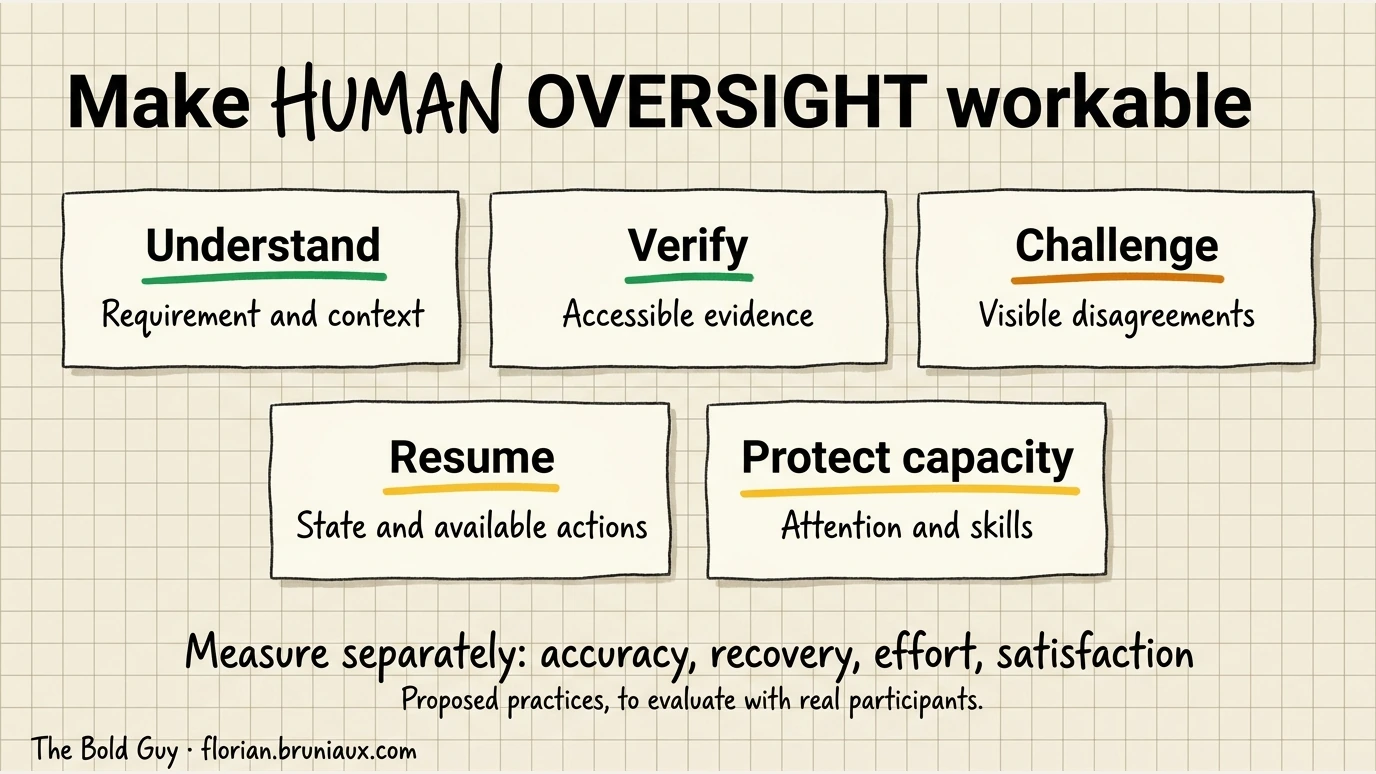
Practices to evaluate with real participants, not a reported intervention. French version and sources.
The apprenticeship ladder ran through the writing phase
Section titled “The apprenticeship ladder ran through the writing phase”The labour market data is unusually good for a question this recent.
| Study | Method | Finding |
|---|---|---|
| Brynjolfsson, Chandar & Chen, “Canaries in the Coal Mine” (Stanford Digital Economy Lab, Nov 2025) | ADP payroll records, ~1 in 6 US workers, 285,000 firms | ~16% relative employment decline for ages 22-25 in the most AI-exposed occupations. Adjustment runs through reduced hiring rather than termination, and through headcount rather than wages. With firm-time fixed effects the signal starts in 2024 |
| Westby, Sasser Modestino et al. (June 2025) | 1.5M+ software developer vacancies, 2021-2023, difference-in-differences with month and location fixed effects | 16.3% drop in the junior share of software developer postings after the November 2022 ChatGPT release, larger than for other computer and mathematical occupations |
| Lichtinger & Hosseini Massoum (Harvard) | LinkedIn and Revelio Labs, ~62M workers, 285,000 firms, 2015-2025 | Junior hiring falls in AI-adopting firms from Q1 2023 while senior headcount rises |
Those three describe the market. Those employment measures do not establish the training mechanism. The ladder ran write, get reviewed, absorb the reviewer’s reasoning, eventually review others. Cutting the first rung does not automatically produce the third one, and the assumption that it does is currently an assumption.
The sources reviewed here do not establish whether review-based training develops judgment at the same rate as writing-based training. An absence in this search is not proof that no study exists. The practices in §13 For Tech Leads & Engineering Managers are built to hedge against the pessimistic case at low cost.
Practices to evaluate locally
Section titled “Practices to evaluate locally”| Practice | Responsible role | Observation |
|---|---|---|
| Split changes according to behavior and verification needs | Author and reviewer | Can the requirement and interacting changes be assessed? |
| Agree pauses and a manageable review workload | Reviewer and team lead | Effort, missed defects and ability to resume, without a universal line or time limit |
| Admit new work only when it can be verified | Capacity owner | Availability declared, deferred task owner and explicit resumption condition |
| Separate exploration and acceptance decisions where useful | Task owner | Whether switching modes changes errors or verification effort |
| Exercise prediction and diagnosis on a new task | Learner and mentor | Correctness, assistance received and transfer, separately from delivery speed |
| Discuss workload and difficulty stopping | Person and team lead | Reported experience, without inferring a diagnosis or an intervention from an approval rate |
Start with the admission worksheet. It can remain a manual policy; the exercise does not require a scheduler or a questionnaire on every action.
Observe attention alongside throughput
Section titled “Observe attention alongside throughput”Clare Liguori’s AWS account at 15:48 describes the pressure of continuous agent work and multiple terminals. Nicole Forsgren at 7:24 discusses flow, feedback and cognitive load as dimensions of developer experience. These interviews complement IFTTD’s practitioner accounts; they do not establish a clinical burnout rate or a causal effect of agent concurrency.
Record concurrent tasks, interruptions, context resumptions, review effort and self-reported difficulty stopping. Agree a concurrency limit to evaluate locally and compare equivalent work before and after the change. Do not convert a line-count heuristic or an individual report into a universal cognitive threshold.
What is not established
Section titled “What is not established”The sources examined for this section do not establish a causal burnout comparison between review-heavy and write-heavy developer work, a protective effect of coding friction, or universal review-size and duration limits for AI-generated changes. Employment trends do not establish an individual’s learning trajectory.
The supervision exercise requires real participants. A simulated person’s answer is not human evidence. Its first use can test feasibility; it cannot establish durable learning or cognitive decline without an appropriate design and further observations.
Red flags checklist
Section titled “Red flags checklist”Warning signs you’re becoming dependent, and what to do:
| Red Flag | What’s Happening | Immediate Action |
|---|---|---|
| Can’t start without AI | Outsourced problem decomposition | Code 30 min daily without AI |
| Don’t understand AI’s code | Copying without learning | Use /explain-back on EVERYTHING |
| Can’t debug AI errors | Never learned debugging | Deliberately break code, fix manually |
| Reported anxiety or difficulty working unaided | Cause not established by this signal | Discuss the experience and adapt the exercise or seek appropriate support |
| Rejected in interviews | Fundamentals atrophied | Practice whiteboard problems without AI |
| Always ask “how” never “why” | Surface-level usage | Force yourself to ask “why this approach?” |
| Every solution looks the same | AI has patterns, you need variety | Study multiple implementations manually |
| Task feels easy but you can’t explain it | Perception gap: AI users rate tasks easier while scoring 17% lower (Shen & Tamkin 2026) | After each task, explain the solution without looking at code |
| Repeated failures or difficulty sustaining attention | Reported difficulty, without a causal diagnosis | Pause, reduce scope or request help; evaluate a locally agreed cadence |
Weekly self-audit
Section titled “Weekly self-audit”Every Friday, ask:
- What did I learn this week that I didn’t know before?
- Could I have done this week’s work without AI?
- Did I understand everything I shipped?
- Am I faster than last month? Am I smarter?
Faster delivery and independent understanding are separate observations. Use an unfamiliar task to investigate a suspected gap.
Sources & research
Section titled “Sources & research”Academic research
Section titled “Academic research”- GitHub Copilot Impact Study (2024) (dl.acm.org): Found productivity gains but identified skill atrophy risks in junior developers
- Student Dependency Patterns in AI-Assisted Learning (IACIS 2024): Documented “learned helplessness” in students over-reliant on AI
- Junior Developer Career Trajectories with AI Tools (Software Engineering Institute): 3-year longitudinal study on skill development
- AI Impacts on Skill Formation (Shen & Tamkin, 2026) (arXiv:2601.20245): Anthropic Fellows RCT (52 devs learning Python Trio with/without GPT-4o): AI group scored 17% lower on skills quiz (Cohen’s d=0.738, p=0.01) with no significant speed gain. Identified 6 interaction patterns, 3 preserving learning (conceptual inquiry, hybrid explanation, generation-then-comprehension) via active cognitive engagement.
Industry reports
Section titled “Industry reports”- Stack Overflow Developer Survey 2025: AI tool adoption and perceived impact on learning
- State of Developer Ecosystem 2025 (JetBrains): AI usage patterns by experience level
- GitHub Octoverse 2025: Code generation adoption rates and practices
Productivity research
Section titled “Productivity research”Sources for §3 The Reality of AI Productivity:
- GitHub Copilot Productivity Study (2024) (GitHub Blog): Enterprise productivity measurements with Accenture
- McKinsey Developer Productivity Report (2024) (mckinsey.com): Comprehensive analysis of AI impact across dev workflows
- Stack Overflow 2024: AI Sentiment (stackoverflow.co): Developer attitudes toward AI tools, productivity perceptions
- Uplevel Engineering Intelligence (2024): Burnout and productivity metrics with AI coding tools
- METR Experienced Developer RCT (2025) (arXiv:2507.09089): Randomized controlled trial (16 experienced devs, 246 issues, repos 1M+ lines): AI tools made developers 19% slower on familiar codebases, despite perceiving themselves 20% faster (39-point perception gap). A task-performance study, not a measurement of long-term skill atrophy.
- Borg et al. “Echoes of AI” RCT (2025) (arXiv:2507.00788): 2-phase blind RCT (151 participants, 95% professional developers): AI users 30.7% faster (median), habitual users ~55.9% faster. Phase 2: downstream developers evolving AI-generated code showed no significant difference in evolution time or code quality vs. human-generated code. First RCT to explicitly target maintainability of AI-assisted code. Co-authored by Dave Farley (“Continuous Delivery”). Note: arXiv preprint (v2 Dec 2025), not yet published in peer-reviewed proceedings.
- DORA/Google DevOps Research (2024): AI tool adoption impact on team performance
Review load, Cognition & recovery
Section titled “Review load, Cognition & recovery”Sources for §14 The Attention Cost of the Review Shift:
- Cohen, Cisco review case study (2006) (primary PDF): observational, single team, pre-AI. The findings motivate local workload calibration, not universal thresholds.
- Siegmund et al., “Understanding Understanding Source Code with fMRI” (ICSE 2014) (cs.cmu.edu, PDF): program comprehension recruits working memory, attention and language regions.
- Floyd, Santander & Weimer (ICSE 2017) (DOI): code review carries a neural signature distinct from prose review, modulated by expertise.
- Peitek et al., code complexity metrics vs measured cognitive load (2021) (DOI): textual size and vocabulary size predict neural and subjective cognitive load during comprehension.
- Parasuraman & Riley, “Humans and Automation: Use, Misuse, Disuse, Abuse” (Human Factors, 1997) (sagepub.com): foundational taxonomy of automation bias and complacency.
- Goddard, Roudsari & Wyatt, automation bias systematic review (2011) (PMC3240751): erroneous decision-support advice raised incorrect-decision risk ~26% versus unaided decisions. Clinical domain; it does not provide an effect size for software review.
- Lee, Sarkar et al., “The Impact of Generative AI on Critical Thinking” (CHI 2025) (microsoft.com): Microsoft Research and Carnegie Mellon, 319 knowledge workers, 936 first-hand examples. Confidence in GenAI predicts less critical thinking, self-confidence predicts more. Critical thinking migrates to verification, integration, task stewardship.
- DORA, Trust in AI (dora.dev): ~39% of developers outside Google trust generative AI output “a little” or “not at all”.
- “Modeling Developer Burnout with GenAI Adoption” (arXiv:2510.07435): survey-based SEM on the JD-R model. Adoption raises burnout through increased job demands, mitigated by job resources and positive perception of the tool. Preprint.
- “At What Cost? Software Developers’ Well-Being in the Age of AI” (arXiv:2605.22349): literature review noting that few studies explicitly measure burnout, stress or work-life balance in AI-assisted development. Useful as an honest statement of the evidence gap.
- Wendsche & Lohmann-Haislah, detachment meta-analysis (Frontiers in Psychology, 2017) (frontiersin.org): 86 publications, k=91 samples, N=38,124. Psychological detachment associated with lower exhaustion, better sleep, higher life satisfaction (r ≈ 0.30-0.36). Heavy work investment negatively related to detachment.
- Involvement profiles in knowledge workers (Frontiers in Psychology, 2020) (PMC7205444): two Norwegian samples. The high-involvement profile (low detachment plus high autonomous motivation) scored lower on emotional exhaustion than the higher-detachment group. Counterweight to reading low detachment as burnout on its own.
- Sonar 2026 State of Code (primary report): trust and verification are separate self-reported measures. The 24% toil measure is not specific to verification of AI output.
Junior pipeline & labour market
Section titled “Junior pipeline & labour market”Sources for §14 The Apprenticeship Ladder Ran Through the Writing Phase:
- Brynjolfsson, Chandar & Chen, “Canaries in the Coal Mine” (Stanford Digital Economy Lab, Nov 2025) (digitaleconomy.stanford.edu): ADP payroll records covering roughly 1 in 6 US workers across 285,000 firms. ~16% relative employment decline for ages 22-25 in the most AI-exposed occupations, driven by reduced hiring rather than termination, adjusting on headcount rather than wages. With firm-time fixed effects the signal begins in 2024.
- Westby, Sasser Modestino et al. (June 2025) (PDF): 1.5M+ software developer vacancies 2021-2023, difference-in-differences with month and location fixed effects. 16.3% drop in the junior share of postings after November 2022, larger than for other computer and mathematical occupations.
- Lichtinger & Hosseini Massoum (Harvard): LinkedIn and Revelio Labs data, ~62M workers across 285,000 firms, 2015-2025. Junior hiring falls in AI-adopting firms from Q1 2023 while senior headcount rises.
Team & organizational research
Section titled “Team & organizational research”- Create Future: AI Training Impact on Junior Developers (2025): Structured AI training raises junior time savings from 14-42% (untrained) to 35-65% (trained) on key tasks. Source for §12 Onboarding Imperative.
- Stanford Digital Economy Study (2025): Software developer employment for ages 22-25 declined ~20% by July 2025. Context for the urgency of structured junior development. understandingai.org analysis. Note: this figure is software-developer-specific and comes from a secondary analysis of an earlier draft. The November 2025 published paper reports ~16% for ages 22-25 across all most-exposed occupations, cited in full under Junior Pipeline & Labour Market.
- LeadDev: Tech CEOs reckon with AI impact on junior developers (2025) (leaddev.com): Organizational perspectives from engineering leaders on structuring junior growth in AI-heavy teams.
- Stack Overflow: AI vs Gen Z (2025) (stackoverflow.blog): Career pathway shifts for junior developers with AI adoption data by experience level.
Practitioner perspectives
Section titled “Practitioner perspectives”- Anthropic Claude Code Best Practices (anthropic.com): Official guidance on effective usage
- ThoughtWorks Technology Radar: AI-assisted development maturity model
- Martin Fowler on AI Pair Programming: Patterns for effective human-AI collaboration
- OCTO Technology: Le développement à l’ère des agents IA (blog.octo.com): Organizational perspective on AI-augmented development: pairs as minimal team unit (bus factor), bottleneck shifts from technical to functional requirements, junior developer integration via pair programming and deliberate practice. Managerial focus, useful context for team leads.
- Matteo Collina: The Human in the Loop (adventures.nodeland.dev): Node.js TSC Chair on the bottleneck shift from coding to reviewing. Response to Arnaldi’s “Death of Software Development.” Key thesis: AI amplifies productivity, but judgment and accountability remain human responsibilities. Quote: “The human in the loop isn’t a limitation. It’s the point.” See detailed analysis.
Educational frameworks
Section titled “Educational frameworks”- Méthode Aristote (methode-aristote.fr): Hybrid human+AI tutoring model
- Bloom’s Taxonomy Applied to AI Learning: Cognitive levels in AI-assisted education
- Zone of Proximal Development with AI: Vygotsky’s theory applied to AI scaffolding
Methodology references
Section titled “Methodology references”See methodologies.md for:
- TDD with AI assistance
- Spec-Driven Development
- Eval-Driven Development for AI outputs
Community experiences
Section titled “Community experiences”Practitioner reports from real-world usage provide empirical validation of theoretical patterns. Croce (2025)1 documents efficiency gains for isolated algorithmic tasks (90s vs 60min average on Advent of Code puzzles), but highlights collaboration trade-offs during solo challenges: decreased team engagement, fewer creative discussions, and reduced diverse approach sharing.
Caveat: These findings are based on N=1 self-reports in competitive programming contexts (Advent of Code), not peer-reviewed research or representative production environments. The collaboration cost observed may be specific to solo challenge contexts rather than team development workflows.
See also
Section titled “See also”In this guide
Section titled “In this guide”- AI Roles & Career Paths: Map of emerging AI roles (Prompt Engineer → Harness Engineer) with career matrix and salary benchmarks
- Methodologies: TDD with Claude: Write tests first, then implement
- Workflows: Spec-First: Understand requirements before code
- Workflows: Plan-Driven: Use /plan mode for complex work
- Ultimate Guide: Mental Models: How to think about Claude interactions
Templates & examples
Section titled “Templates & examples”- Learning Mode CLAUDE.md: Configuration template
- /learn:quiz Command: Self-testing slash command
- /learn:teach Command: Step-by-step concept explanations
- /learn:alternatives Command: Compare different approaches
- Learning Capture Hook: Automated insight logging
External resources
Section titled “External resources”- Anthropic Prompt Engineering Guide: Better prompts = better learning
- The Pragmatic Programmer: Timeless principles for deliberate practice
- AI for Engineers: AI fundamentals (ML, transformers, tokenization)
- Step by Token: 21-chapter interactive guide explaining how LLMs work mechanically, from tokenization through agents and KV cache. Free, in 8 languages. Pairs well with the prompt engineering and agents sections of this guide.
- How to Build an Agent (Thorsten Ball, Amp), builds a minimal coding agent from scratch in ~300 lines: chat loop, tool definitions, agentic loop. The most-cited walkthrough of the same mechanism documented in Architecture: The Master Loop, useful for readers who learn a mechanism better by building a toy version of it first.
Quick reference card
Section titled “Quick reference card”UVAL protocol summary
Section titled “UVAL protocol summary”U — UNDERSTAND FIRST State → Brainstorm → Identify gaps → THEN ask AI
V — VERIFY Explain the invariant → Predict behavior → Investigate gaps
A — APPLY Predict → Test a requirement → Diagnose → Adapt only when needed
L — LEARN One insight per session → Log it → Review laterThe 70/30 rule
Section titled “The 70/30 rule”Learning new things: 70% struggle, 30% AIApplying known skills: 30% struggle, 70% AIDaily minimums
Section titled “Daily minimums”☐ 15 min: Code something without AI☐ 5 min: Explain one piece of code out loud☐ 1 min: Log one thing you learnedClaude Code commands for learning
Section titled “Claude Code commands for learning”/explain — Understand existing code/learn:quiz — Test your understanding/learn:teach <topic> — Learn something new/learn:alternatives — Compare approachesThis guide is part of the Claude Code Ultimate Guide. For questions or contributions, see the main repository.
Footnotes
Section titled “Footnotes”-
Steve Croce, “What I Learned Challenging Claude to a Coding Competition”, Anaconda Blog, Jan 16, 2026. Field CTO perspective from 12 days of Advent of Code competition (human vs Claude Code). Reported metrics: Claude 90s/puzzle average, human 60min/puzzle average, no debugging until day 6. Note: Single-participant study on algorithmic puzzles, not production development. ↩